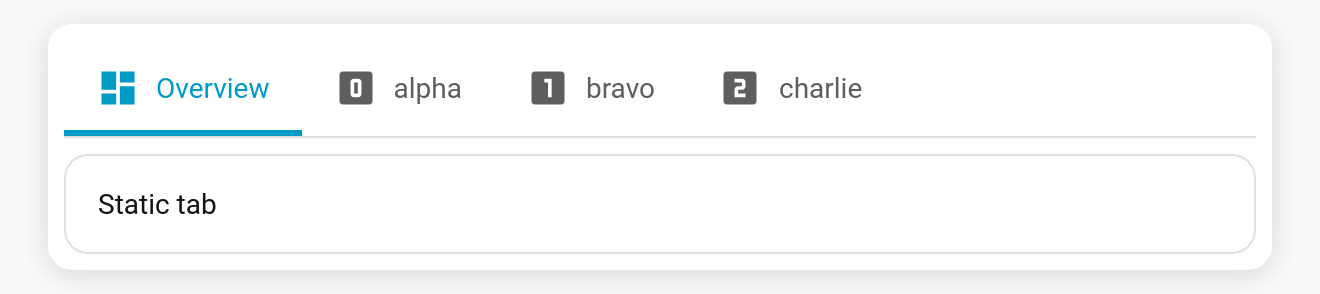
Dynamic tabs (auto_tabs)
Generate a tab per item from live Home Assistant data instead of hand-writing them. Point a Jinja template at a list — entities in an area, every camera, a custom list — and Tabdeck builds one tab for each element, keeping them in sync as the list changes.
Top-level key: auto_tabs
type: custom:tabdeck-card
tabs:
  - name: Overview            # static tabs still work; they stay first
    icon: mdi:view-dashboard
    card: { type: markdown, content: All cameras below }
auto_tabs:
  template: >                 # HA Jinja — must return a list
    {{ states.camera | map(attribute='entity_id') | list }}
  tab_template:               # blueprint filled once per list item
    name: "{{ item }}"
    icon: mdi:cctv
    card:
      type: picture-entity
      entity: "{{ item }}"
Built-in sources: a tab per area, floor, label, domain, device, list, calendar, camera or zone
No Jinja needed. Set source and Tabdeck builds one tab per Home Assistant area (or one of the other sources below), each showing what belongs to it:
type: custom:tabdeck-card
auto_tabs:
  source: areas            # or: labels
  domains: [light, switch, climate]   # optional: only these entity domains
  exclude: [garage]        # optional: area / label ids to skip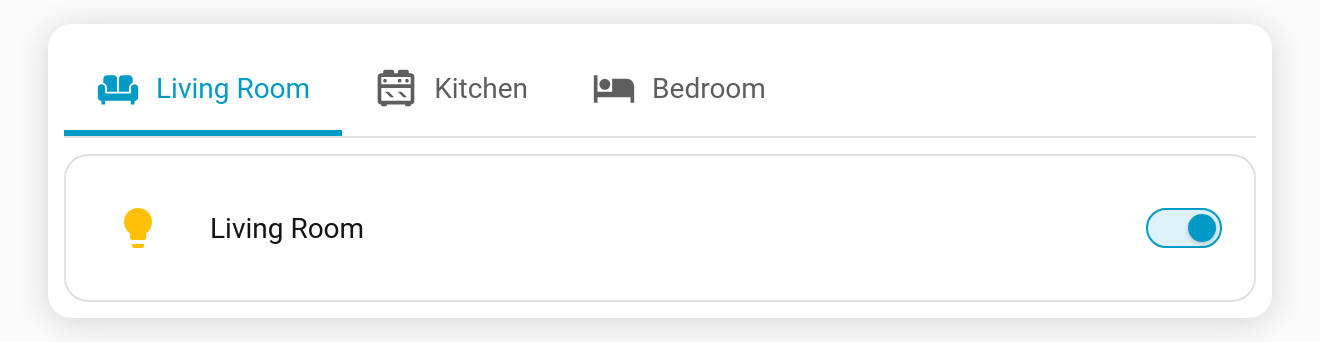
- Membership comes from HA's own
area_entities()/label_entities(), so entities that belong to an area through their device are included, exactly as in HA. - Areas or labels left with no matching entities are skipped.
- Areas use their icon from the area registry (falling back to
mdi:texture-box). Labels usemdi:label-outline. - Tabs follow HA's area / label order and update live when areas, labels or assignments change.
- Each item is
{ id, name, icon, entities }, so you can supply your owntab_templateinstead of the default entities card. For example, HA's area card:
auto_tabs:
  source: areas
  tab_template:
    name: "{{ item.name }}"
    icon: "{{ item.icon }}"
    card:
      type: area
area: "{{ item.id }}"sourcereplacestemplate(if both are set,sourcewins). The visual editor keeps the shortsourceform in your YAML; the generated Jinja is never written out.
All sources
source | One tab per… | Default content |
|---|---|---|
areas | area (its registry icon) | entities card of the area's entities |
labels | label | entities card of the labelled entities |
floors | floor (its registry icon) | entities card of every entity in the floor's areas |
domains | domain in domains (default: light, switch, climate, cover, fan, media_player, lock, camera, vacuum) | entities card of that domain's entities |
devices | device (sorted by name; use domains to keep it short) | entities card of the device's entities |
todo | to-do list | HA's to-do list card; the badge shows the open items |
calendars | calendar | HA's calendar card (list view) |
cameras | camera | picture-entity card of the camera |
zones | zone | map of the zone and the people in it; the badge counts them |
domainsfilters the entities ofareas,labels,floorsanddevices; fordomainsit picks the domains.excludetakes area / floor / label / device ids, domains, or entity ids (camera.doorbell) for the per-entity sources.- Each item has
id,name,iconand, where it applies,entitiesandcount, for your owntab_template.
Tiles instead of a list: content: tiles
For areas, floors and labels, content: tiles gives each tab a grid of HA tile cards instead of an entities card:
auto_tabs:
  source: floors
  content: tiles
  domains: [light, switch, climate]   # optional
Area, floor and label tabs without a card (auto content)
A static tab with area, floor or label and no card fills itself with tile cards for every entity there, the way HA's own area dashboards do:
tabs:
  - name: Kitchen
    icon: mdi:silverware-fork-knife
    area: kitchen               # or floor: ground_floor, or label: lights
domains: [light, switch] # optional: only these domains- Entities placed in the area through their device are included; hidden entities and config / diagnostic ones are left out.
- The tab updates when entities are added, removed or moved in HA.
- With nothing to show, the tab says so instead of staying empty.
- The visual editor has an Area picker for this;
floor,labelanddomainsare YAML.
Options
| Key | Type | Description |
|---|---|---|
template | string (Jinja) | Required unless source is set. Rendered by Home Assistant; must resolve to a list. Each element becomes a tab. |
source | areas | labels | floors | domains | devices | todo | calendars | cameras | zones | Built-in source instead of template (see above), with optional domains, exclude and content: tiles. |
tab_template | tab config | Optional blueprint. When present, it's filled once per list item using the placeholders below. When absent, each list element is used directly as a complete tab config. |
Placeholders (inside tab_template)
| Placeholder | Resolves to |
|---|---|
{{ item }} | The current list element (a string, or an object). |
{{ item.some.prop }} | A dotted-path lookup when the element is an object, e.g. {{ item.entity }}. |
{{ index }} | The 0-based position in the list. |
A placeholder that is the whole value keeps the resolved type (so entity: "{{ item }}" yields the item itself); a placeholder inside a larger string is interpolated as text (name: "Cam {{ index }}").
Items can be strings or objects
auto_tabs:
  template: >
    {{ [
      {'label': 'Front',  'id': 'camera.front_door'},
      {'label': 'Drive',  'id': 'camera.driveway'}
    ] }}
  tab_template:
    name: "{{ item.label }}"
    card: { type: picture-entity, entity: "{{ item.id }}" }
Template returns full tabs (no tab_template)
If you omit tab_template, the list elements are treated as ready-made tab configs:
auto_tabs:
  template: >
    {{ [
      {'name': 'Lights', 'icon': 'mdi:lightbulb', 'card': {'type': 'light', 'entity': 'light.lounge'}},
      {'name': 'Climate', 'card': {'type': 'thermostat', 'entity': 'climate.hall'}}
    ] }}
Behaviour
- Static first, generated appended. Existing
tabs:keep working untouched; generated tabs are added after them. You can also useauto_tabswith no statictabsat all. - Live refresh. When the template result changes (an entity appears/disappears), the tab set rebuilds automatically. Your current tab is preserved by name where possible, otherwise the position is clamped into range.
- Two template layers, kept separate.
auto_tabs.templateis rendered by Home Assistant. The{{ item }}/{{ index }}placeholders are resolved inside the card — and only those tokens. Any other{{ ... }}(for example a generated card's own{{ states('sensor.x') }}badge) is left untouched and rendered by Home Assistant as normal. - Empty / not-ready. While the template is still rendering, errors, or doesn't return a list, no generated tabs are shown (and a deck with only
auto_tabssimply shows nothing until the list arrives). - No cap. Large lists are fine — combine with
scroll_buttons/overflow_menuto handle a long bar. - Configured in YAML (no visual-editor controls), like
visibilityandauto_select.
Example
A static Overview tab followed by one generated tab per item, with {{ index }} driving the icon: