
Alert pulse
Give a tab alert conditions, and it pulses in the alert colour while they're met. This draws the eye to something that needs attention, like a door left open, a leak, or a freezer that's too warm, even when you're on another tab.
Per-tab key: alert, a list of conditions using the same syntax as visibility (state, numeric_state, screen, time, user, template, and/or/not). All must be met.
type: custom:tabdeck-card
tabs:
  - name: Home
    icon: mdi:home
    card: { ... }
  - name: Front door
    icon: mdi:door
    alert:
      - condition: state
        entity: binary_sensor.front_door
        state: "on"
    card: { ... }
  - name: Freezer
    icon: mdi:fridge
    alert:
      - condition: numeric_state
        entity: sensor.freezer_temperature
        above: -12
    card: { ... }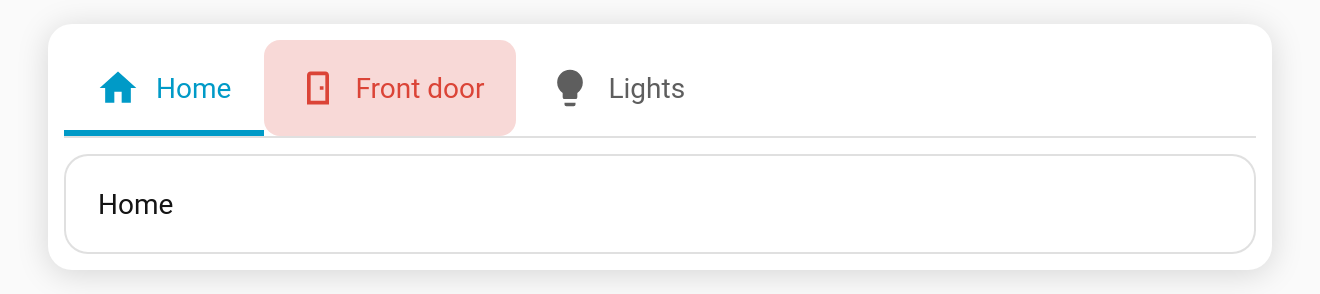
"Open for more than 5 minutes"
Duration checks go through a template condition:
alert:
  - condition: template
    value_template: >-
      {{ is_state('binary_sensor.front_door', 'on') and
         (now() - states.binary_sensor.front_door.last_changed).total_seconds() > 300 }}
In the visual editor, use the tab's Alert condition builder. See The Visual Editor.
Alerting tabs first (alert_first)
With alert_first: true, tabs whose alert is active move to the front of the bar, keeping their order among themselves, and go back when the alert clears. The selected tab stays selected.
Snooze (alert_snooze)
alert_snooze: 30 lets you long-press an alerting tab to silence its pulse for 30 minutes. The snooze is per browser and ends early when the alert clears, so the next alert pulses again. While alert_snooze is on, a long-press on an alerting tab snoozes it instead of running its hold_action.
Styling
| Variable | Default | Effect |
|---|---|---|
--tabdeck-alert-color | var(--error-color) | Pulse tint and label/icon colour. |
--tabdeck-alert-radius | 8px | Corner radius of the pulse. |
Set them with styles, e.g. styles: { --tabdeck-alert-color: orange }.
Behaviour
- The tab keeps working normally (tap to select); the pulse is only visual.
- Under reduced motion the pulse becomes a steady tint.
- A per-tab
coloroverrides the alert's label/icon colour, but the tint still pulses.