
Why is this tab hidden? (live condition check)
The visual editor checks every tab's conditions against your live Home Assistant state, so you don't have to guess why a tab isn't showing.
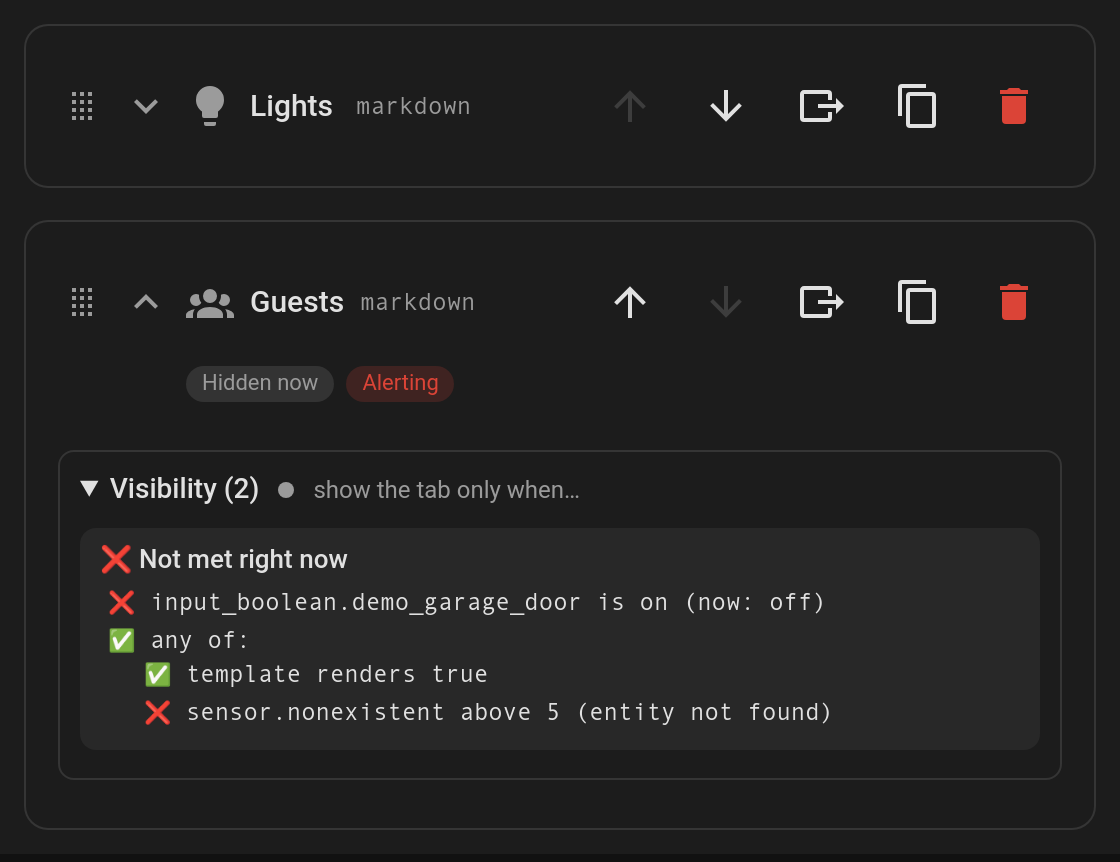
What you get
- Status chips under each tab's header in the tab list:
- Hidden now: the tab's
visibilityconditions aren't met, so it isn't on the dashboard right now. - Alerting: the tab's
alertconditions are met, so it's pulsing.
- Hidden now: the tab's
- Each condition section (Visibility, Alert, Default when) has a dot in its title (green = met, grey = not met). Open it to see a breakdown with ✅ / ❌ for every condition, including nested
and/or/notgroups:stateandnumeric_stateshow the entity's current value, e.g.(now: off).- A misspelt or removed entity shows entity not found.
templateconditions are rendered live by Home Assistant. They show waiting for Home Assistant until the first result arrives.
- Everything updates as states change, and the editor only redraws when a result actually changes.
No configuration is needed. While editing the dashboard, the card itself also shows hidden tabs (see Edit mode helpers).