Visibility
Cards inside a template support Home Assistant’s own visibility conditions, and those
conditions can use variables — so one template can carry its own show/hide logic and each
instance decides what triggers it.
decluttering_templates:
  motion_alert:
    card:
      type: tile
      entity: '[[sensor]]'
      name: '[[name]]'
      visibility:
        - condition: state
          entity: '[[sensor]]'
          state: '[[show_when]]'
    default:
      - show_when: 'on'
      - name: Motion
- type: custom:decluttering-card-plus
  template: motion_alert
  variables:
    - sensor: binary_sensor.hallway_motion
    - name: Hallway motion

- type: custom:decluttering-card-plus
  template: motion_alert
  variables:
    - sensor: binary_sensor.front_door
    - name: Front door

- type: custom:decluttering-card-plus
  template: motion_alert
  variables:
    - sensor: binary_sensor.garage_door
    - name: Garage door
    - show_when: 'off'
Three cards, one template. Only the ones whose condition is met render:
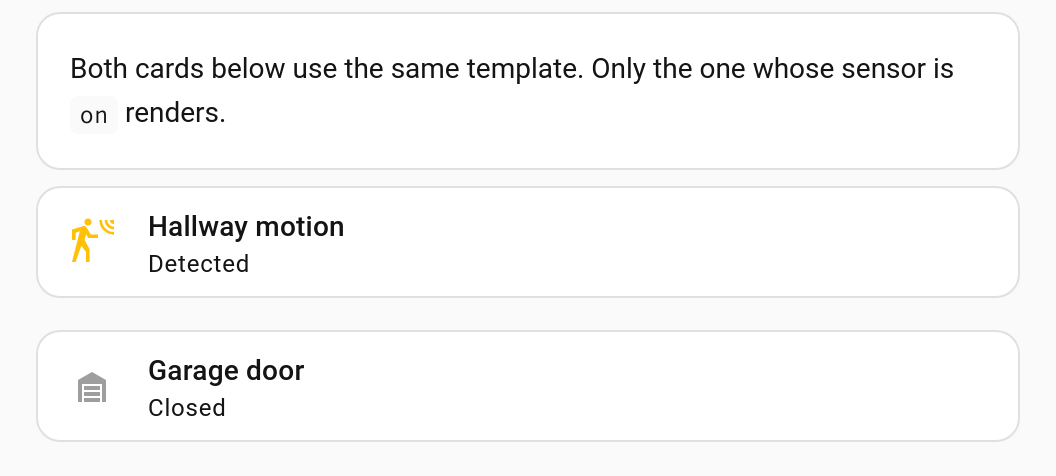
The hallway sensor is detecting, so it shows. The front door is closed, so its card is
hidden entirely. The garage door card overrides show_when to 'off', so it shows
because the door is closed.
No gaps
When a card is hidden by its conditions, the wrapper collapses with it. There is no empty space where the card would have been, and no stray padding — the cards below simply move up.
This holds however the card hides itself, not just for visibility: a conditional card
with no matching condition, a card that sets display: none on itself, a stylesheet rule,
or the hidden attribute all collapse the wrapper the same way.
In a sections view the card’s grid cell goes with it (v1.12.0+), the same as for a card written inline, and a section whose cards are all hidden disappears so the others close up. Before v1.12.0 the cell stayed empty and a section of hidden cards kept its place on the page.
Editing stays visible
While the dashboard is in edit mode, templated cards render regardless of their conditions, so you can still see and click the thing you are editing. Leave edit mode and the conditions apply again.
The same is true of the preview inside the card editor dialog.
A template that decides which copies to build (v2.9.0+)
A card’s visibility: builds the card and then hides it, following an entity’s state.
visibility: written on the template, beside card:, reads the variables instead, and a
copy that fails a condition is never built at all. A repeat over five rooms can come out as
three tiles, and a forty-room repeat stays cheap.
decluttering_templates:
  room_climate:
    variables:
      - name: area
      - name: temperature
        type: entity
    visibility:
      - variable: temperature
        exists: true
      - variable: area
        not_in: [Garage, Shed]
    card:
      type: tile
      entity: '[[temperature]]'
      name: '[[area]]'
type: custom:decluttering-card-plus
template: room_climate
columns: 2
for_each:
  - area: Kitchen
    temperature: sensor.kitchen_temperature
  - area: Garage
    temperature: sensor.garage_temperature
  - area: Bedroom
    temperature: sensor.bedroom_temperature
  - area: Loft
  - area: Living Room
    temperature: sensor.living_room_temperature
Three tiles are built. Out of edit mode the garage and the loft are simply not there. In edit mode each copy left out is drawn as a dashed slot naming the copy and the condition that closed it, so a missing room is a visible decision rather than a silent gap:
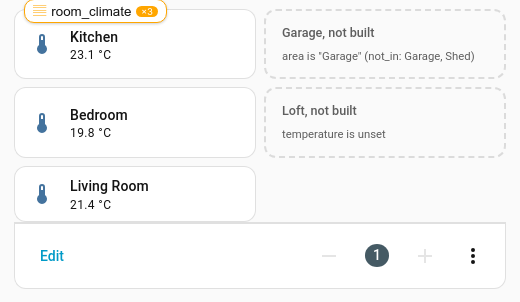
The garage fails not_in, the loft has no temperature sensor.
Each condition names a variable: and one test:
| Condition | Holds when the variable |
|---|---|
exists: true |
has a value (exists: false: has none). An empty string counts as none |
equals: x |
is x |
not_equals: x |
is anything but x, or has no value |
in: [a, b] |
is one of the list |
not_in: [a, b] |
is none of the list, or has no value |
matches: 'living*' |
fits the pattern, * standing for anything |
Every condition listed must hold. A single condition can be written as a mapping instead of
a list. in and not_in also take a comma-separated string, in: yes, maybe. Values are
compared as text, so equals: true matches the yes/no value true, and equals: 3
matches the number 3.
A variable with no value fails equals, in and matches, since there is nothing to
compare. required: true on a declaration is still the short way of writing exists: true
for one variable.
What the conditions can read
The variables as they end up for that copy: the item’s own values, the card’s
variables:, the template’s defaults and let: values, worked out first. Never an entity’s
state: the conditions are settled once, when the card is built, and cost nothing after. For
a card that should come and go with a state, use the card’s own visibility: above.
In a repeat they can read the copy’s place too, index, index0, count, first and
last, counted among all the candidates. variable: first with equals: true keeps only
the first; variable: index with not_equals: 1 drops it. The copies that are built are
numbered again afterwards, so [[index]] on the page runs 1, 2, 3 with no gaps.
Where it applies
| Used by | A copy that fails |
|---|---|
| a repeating card | is not built. Edit mode shows its dashed slot, named by the item’s name, area, friendly_name, floor, label, device, entity or item, or by its number |
| a single card | hides itself and gives up its place. Edit mode shows the dashed slot, named by the template |
a group: template |
hides the whole group, and a section holding nothing else disappears |
| a repeated row or picture element | is not built. Nothing is drawn in its place, in edit mode either |
Different values on a phone: variables_mobile (v2.9.0+)
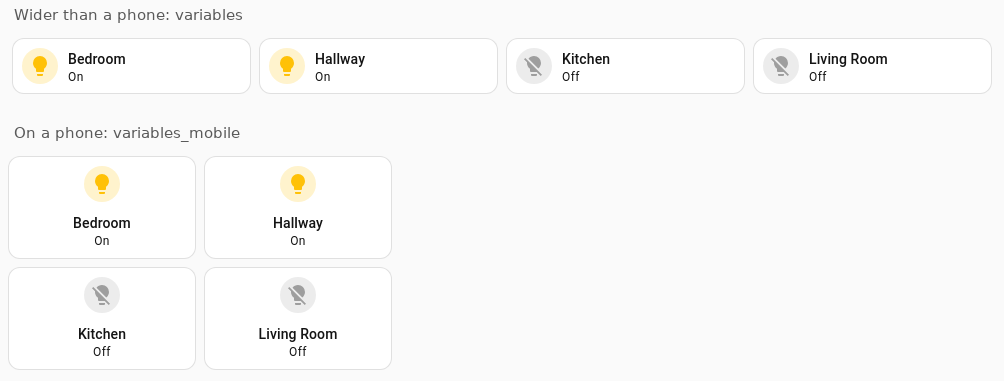
Not hiding a card on a phone, but building it differently. variables_mobile: on the card
is a second set of values, laid over variables: while the screen is a phone’s:
decluttering_templates:
  light_strip:
    card:
      type: custom:decluttering-card-plus
      template: light_tile
      columns: '[[columns]]'
      for_each_from:
        domain: light
        sort: name
      variables:
        - vertical: '[[vertical]]'
  light_tile:
    card:
      type: tile
      entity: '[[entity]]'
      vertical: '[[vertical|bool]]'
type: custom:decluttering-card-plus
template: light_strip
variables:
  - columns: 4
  - vertical: false
variables_mobile:
  - columns: 2
  - vertical: true
A phone’s screen is decided the way Home Assistant decides it for its own narrow layout: 870
pixels wide or less. So a card in a narrow column on a desktop is not “mobile”, and a
desktop window dragged narrow is. When the card should go by its own width instead, say
where with mobile_below:, in pixels, and the card is measured itself:
type: custom:decluttering-card-plus
template: light_strip
mobile_below: 500
variables:
  - columns: 4
variables_mobile:
  - columns: 2
A mobile value beats the card’s own value of the same name, and anything the card does not
set again in variables_mobile: keeps its usual value. A template’s let: still beats both,
as it beats everything a card sets. Crossing the line, by turning a tablet or resizing a
window, builds the card again once; nothing happens between one pixel and the next. A card
without variables_mobile: never watches its width, so mobile_below: on its own does
nothing.
Conditions on the instance
visibility also works on the custom:decluttering-card-plus card itself, where Home
Assistant applies it in the usual way, before the template is involved at all:
- type: custom:decluttering-card-plus
  template: room_light
  variables:
    - light: light.living_room
    - room: Living Room
  visibility:
    - condition: user
      users:
        - 581fbf6b1e0d4d0f9e2a0e0b0c0d0e0f
Use whichever fits:
Put visibility on… |
When |
|---|---|
| the template | Every instance hides for the same kind of reason, with the specifics passed as variables |
| the instance | This one card, for a reason unrelated to the template |
Both at once is fine — the card is shown only if both agree.
On the instance it works for cards and badges, because Home Assistant applies it around
those. A row in an Entities card or a picture element has no such wrapper, so visibility
there does nothing; use a conditional row or element inside the template instead.
Condition types
Anything Home Assistant supports: state, numeric_state, screen, user, and, or.
Variables can be used anywhere in them.
decluttering_templates:
  wide_only:
    card:
      type: tile
      entity: '[[entity]]'
      visibility:
        - condition: screen
          media_query: '[[breakpoint]]'
    default:
      - breakpoint: '(min-width: 768px)'