Using Templates
Once a template exists (Defining Templates), you instantiate it with
custom:decluttering-card-plus.
type: custom:decluttering-card-plus
template: room_light
variables:
  - light: light.living_room
  - room: Living Room
That is the whole syntax. template: names the template, variables: fills in its holes.
Everything else on the card is optional, and is listed here so you can see what the card can
do from the one page. Each row links to where it is explained.
| Key | What it does | See |
|---|---|---|
type |
custom:decluttering-card-plus |
|
template |
The template to use. Required, unless template_by_domain is set |
below |
variables |
The values to fill in, as a mapping or a list | Variables |
template_by_domain (v2.0.0+) |
A template per entity domain instead of one | below |
rebuild_on (v2.0.0+) |
Builds the card again when one of these entities’ state changes, so a template can change with it; [[entity|state]] reads them. Placeholders, and a rebuild_on on the template, count too (v2.10.0+) |
Variables |
rebuild_on_watch (v2.10.0+) |
Which changes of a rebuild_on entity count: read for only what the template reads, or a list of parts. A template can carry it and its own rebuild_on too |
Variables |
card / badge / row / element (v1.12.0+) |
Changes laid over what the template builds, for this card only | below |
on_error (v2.0.0+) |
What to show instead of an error card | below |
inherit_variables (v1.13.0+) |
On a card inside a template: take every variable of the card around it | below |
for_each, for_each_from |
Builds a copy of the template per item | Repeating a Template |
columns, min_column_width, gap, empty, lazy, lazy_eager |
How a repeat is laid out | Repeat Reference |
slots (v2.9.0+) |
Cards of this card’s own, put where the template left a [[name|slot]] |
Slots |
variables_mobile, mobile_below (v2.9.0+) |
Values laid over variables on a phone, or while the card is narrow |
Visibility |
grid_options (v1.2.0+) |
The size it asks for in a sections view | Styling |
visibility |
Home Assistant’s conditions for showing it | Visibility |
style |
CSS for this card | Styling |
fit (v1.1.0+) |
contents gives up the card’s own box |
Styling |
debug (v1.2.0+), name (v1.14.0+), redact (v2.1.0+) |
Show or log what the card built | Troubleshooting |
strict (v1.2.0+) |
Refuse the card, or report, when a placeholder is left unfilled; from v2.9.0 one setting each for errors and warnings | Checks and Strict |
Every key, with its type and an example, is on Configuration Reference.
variables: can be written two ways, and both mean the same:
variables:              # a mapping
  light: light.kitchen
  room: Kitchen
variables:              # a list, one name per entry
  - light: light.kitchen
  - room: Kitchen
The list is what the original decluttering card required, so older examples use it. Mixing
the two in one variables: is what goes wrong: a - in front of some names and not others
is a YAML error.
Where it goes
The same custom:decluttering-card-plus type is used everywhere. What matters is that the
template’s content type suits the place you put it.
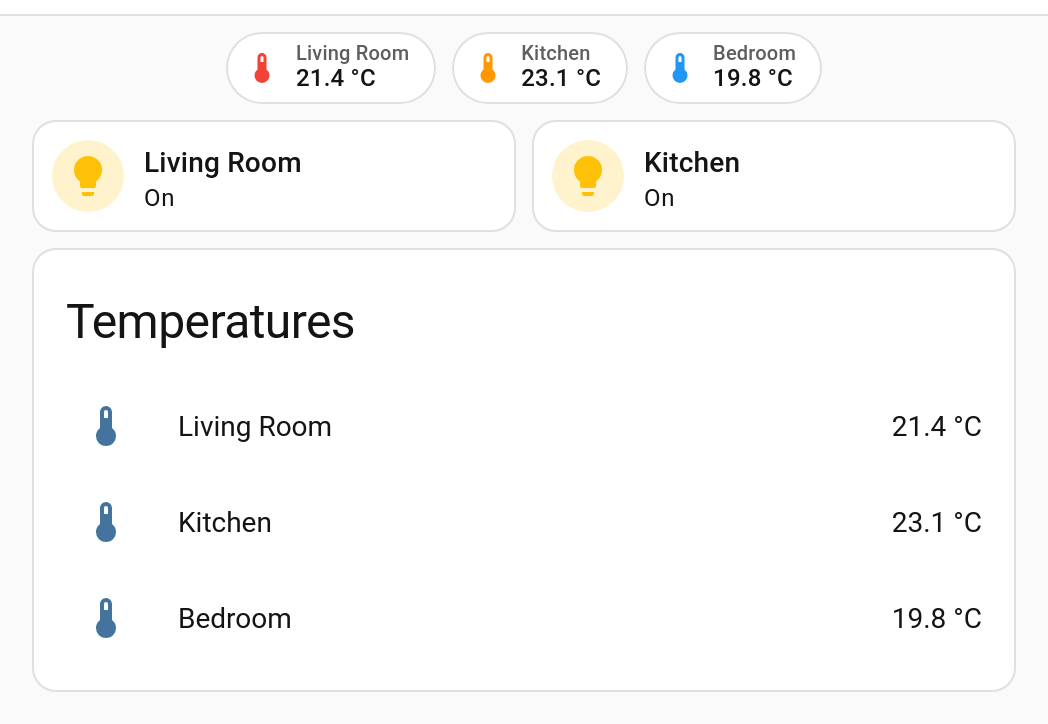
Three places, one card type: the badges, the two tiles and the three rows are each
custom:decluttering-card-plus pointing at a badge, card and row template.
As a card
Anywhere a card goes — a view, a stack, a grid, a section:
views:
  - title: Home
    cards:
      - type: custom:decluttering-card-plus
        template: room_light
        variables:
          - light: light.living_room
          - room: Living Room
As a badge
In a view’s badges: list (sections views):
views:
  - type: sections
    badges:
      - type: custom:decluttering-card-plus
        template: power_badge
        variables:
          - entity: sensor.solar_power
          - name: Solar
As an entity row
In an Entities card’s entities: list:
- type: entities
  title: Temperatures
  entities:
    - type: custom:decluttering-card-plus
      template: temperature_row
      variables:
        - entity: sensor.living_room_temperature
        - name: Living Room
As a picture element
In a Picture Elements card’s elements: list, where style carries the positioning:
- type: picture-elements
  image: /local/floorplan.png
  elements:
    - type: custom:decluttering-card-plus
      template: room_marker
      variables:
        - light: light.living_room
      style:
        top: 32%
        left: 26%
See Cards, Badges, Rows and Elements for the detail of each.
Nesting
A template’s content can itself contain custom:decluttering-card-plus cards, so templates
can build on each other:
decluttering_templates:
  room_light:
    card:
      type: tile
      entity: '[[light]]'
      name: '[[room]]'

  room_pair:
    card:
      type: horizontal-stack
      cards:
        - type: custom:decluttering-card-plus
          template: room_light
          variables:
            - light: '[[light_a]]'
            - room: '[[room_a]]'
        - type: custom:decluttering-card-plus
          template: room_light
          variables:
            - light: '[[light_b]]'
            - room: '[[room_b]]'
Variables pass straight through — '[[light_a]]' is substituted in room_pair, and the
result is handed to room_light as its light.
Passing everything down: inherit_variables (v1.13.0+)
When the inner card needs most of the outer card’s variables, listing each one gets old.
inherit_variables: true hands the inner card every variable the outer card has, its own
values, view and section values and template defaults included, with its own variables:
winning:
decluttering_templates:
  room_column:
    card:
      type: vertical-stack
      cards:
        - type: custom:decluttering-card-plus
          template: room_light
          inherit_variables: true          # gets light and room from the card using room_column
        - type: custom:decluttering-card-plus
          template: room_climate
          inherit_variables: true
          variables:
            sensor: 'sensor.[[room|slug]]_temperature'
The |slug after room is a step: it turns Living Room into living_room, so a room’s
name can make an entity id. Steps are introduced on
Variables.
The outer template’s let: values and the dashboard’s decluttering_defaults are not handed
down; the inner card works its own out. More:
Templates inside templates.
Changing one card without a new template (v1.12.0+)
Sometimes one card needs to differ by a line: another icon, a colour, a different tap
action. Rather than a new template or an extends: child, give the card its own card:
block. It is laid over what the template builds:
decluttering_templates:
  room_light:
    card:
      type: tile
      entity: '[[light]]'
      name: '[[room]]'
      icon: mdi:ceiling-light
- type: custom:decluttering-card-plus
  template: room_light
  variables:
    - light: light.living_room
    - room: Living Room
- type: custom:decluttering-card-plus
  template: room_light
  variables:
    - light: light.kitchen
    - room: Kitchen
  card:
    icon: mdi:light-flood-down
    color: teal
    features:
      - type: toggle
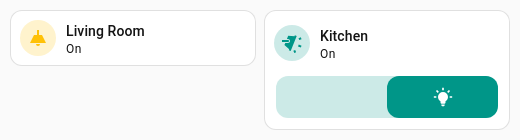
It merges the way extends: does: mappings key by key, while lists and plain values are
replaced outright. One addition: null removes a key the template sets, so icon: null
gives the tile back the entity’s own icon.
The block is applied after the variables are filled in, so it is taken literally and always
wins. A [[placeholder]] written inside it is not substituted. Under for_each or
for_each_from it applies to every copy, and the editor’s preview and Eject both include
it.
The block is named after the template’s kind: card: for a card template, badge:,
row: or element: for the others. A block that does not match, badge: on a card
template say, is ignored with a warning in the console and the editor.
Editing a list instead of replacing it (v2.0.0+)
A list in the card: block replaces the template’s list outright, so adding one row to an
Entities card used to mean copying out every row. Write a mapping of list edits in its
place and the template’s list is changed instead:
decluttering_templates:
  room_list:
    card:
      type: entities
      title: '[[title]]'
      entities:
        - entity: light.living_room
        - entity: light.kitchen
        - entity: light.bedroom
- type: custom:decluttering-card-plus
  template: room_list
  variables:
    - title: With list edits
  card:
    entities:
      __update__:
        0: { name: Lounge lamp, icon: 'mdi:lamp' }
      __remove__: [1]
      __append__:
        - entity: sensor.living_room_temperature
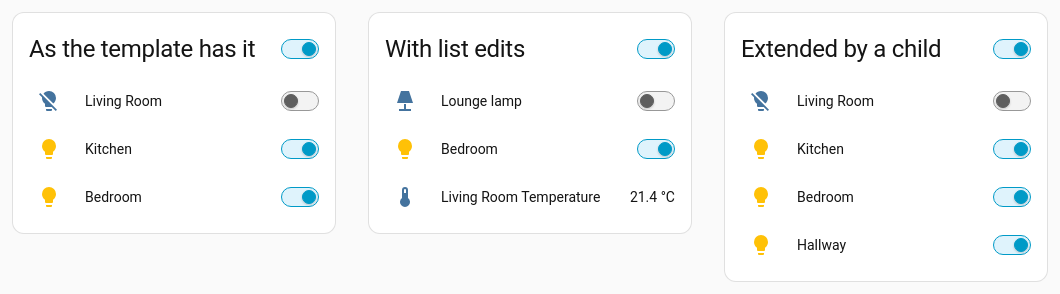
Left to right: the list as the template has it, the card above, and an extends: child
that appends a fourth light.
__append__and__prepend__take a list of items to add at the end or the start.__update__takes index-to-value pairs. A mapping merges into the item there the way the rest of the block does, anything else replaces it, andnullremoves it. An index past the end adds the item, and a negative index counts from the end, so-1is the last.__remove__takes a list of indexes to take out.
Every index means a place in the list as the template had it, so the edits do not shift
each other: in the card above, __remove__: [1] is the kitchen whatever __update__ did
to item 0. The mapping is only read as edits when every key in it is one of the four and
the template has a list there (or nothing). Over a mapping they are ordinary keys.
The same edits work in a template that extends:
another, on the parent’s lists. (From issue #209.)
A template per domain: template_by_domain (v2.0.0+)
template_by_domain: picks the template from the domain of the card’s entity variable.
Its point is a repeat: one card over a room’s entities can give the lights a light tile and
the sensors a graph, rather than one card per domain.
type: custom:decluttering-card-plus
template_by_domain:
  light: light_tile
  sensor: sensor_graph
  default: plain_tile
columns: 2
for_each:
  - entity: light.living_room
  - entity: light.kitchen
  - entity: sensor.living_room_temperature
  - entity: sensor.kitchen_temperature
  - entity: binary_sensor.hallway_motion
  - entity: binary_sensor.front_door
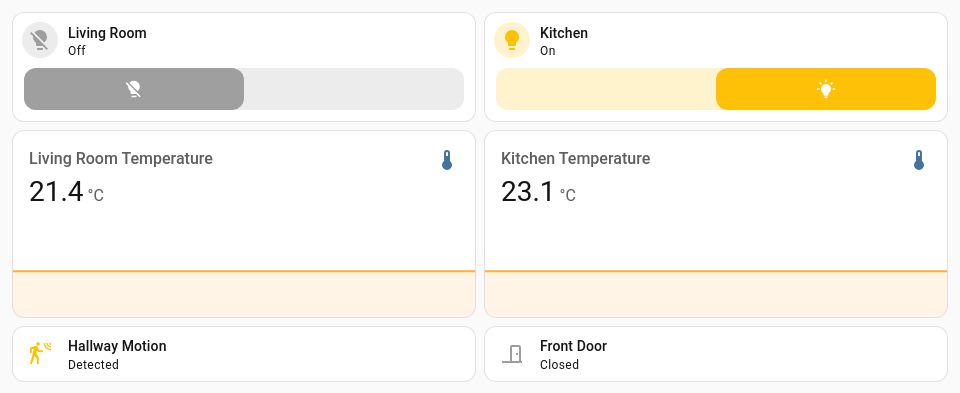
One card, six copies, three templates: each copy chose its own by its entity’s domain.
Each copy chooses for itself. A domain with no entry takes default:, and with no
default: the card’s own template:, which can be written alongside the mapping. With
neither, the card says which domain had nothing to use. The entity is read as the copy ends
up with it, from the item, the card’s variables, overrides or a default, and one built
from other variables such as light.[[room]] is worked out first. The defaults read at that
point are those of the template the card falls back on, the only one known before choosing,
and an entity that came from there is handed on to the template picked.
A card that is not repeated chooses once and is then built as if it had named that template, so it works for badges and rows too. A repeat can only hold cards, as before. Where used and dashboard health count the card as a use of every template it names, and renaming one in the editor follows into the mapping. The card editor says the card picks by domain and edits what the copies share; the mapping itself is changed in the code editor.
When a card cannot be built: on_error (v2.0.0+)
A card that cannot be built shows an error card that names the template, points at the line
that failed and, in edit mode, offers the fix (v2.9.0+; before that, Home Assistant’s red
error box): see the error card. on_error: shows
something of your choosing instead, or nothing at all. It can go on the card, or on the
template for every card using it, and the card’s wins.
decluttering_templates:
  weather_panel:
    on_error:
      type: markdown
      content: The weather card for **[[place]]** is not installed yet.
    card:
      type: custom:not-a-real-weather-card
      entity: '[[entity]]'
- type: custom:decluttering-card-plus
  template: weather_panel
  variables:
    - place: Inverness
- type: custom:decluttering-card-plus
  template: weather_panel
  on_error: hide
  variables:
    - place: Inverness

Without on_error, with it on the template, and on_error: hide, which leaves only the
tile written after it. The first is the red error of v2.0.0; from v2.9.0 it is the
error card.
It applies when the template does not exist, templates use each other in a loop or nest too
deep, strict: true refuses, the template defines two things or none, a repeat cannot be
built, or the card it builds is a custom: card whose element is not defined. That last one
is decided the way Home Assistant decides it, after waiting two seconds for the resource to
load, and if the card turns up later it is built as meant.
The value is a config of the same kind the template builds, a badge for a badge template
and so on, or hide, which shows nothing and gives the place back the way a hidden card
does. It gets the card’s variables substituted, with the template’s defaults when there is
a template; when the template is the thing that is missing, only the card’s own variables
are there to use, and the stand-in is shown as a badge in a view’s badges and as a card
anywhere else. The original error still goes to the browser console, saying on_error was
shown instead, and a stand-in that fails too shows the error card.
Using a template in a place it was not meant for
Nothing stops you putting a row template into a view as a card, or a card template into
an Entities card. It will usually render, but it will not look right — rows expect the
layout an Entities card gives them, cards expect to be cards. Match the content type to the
place.
What the card does around your content
Instantiating a template is not just a copy-and-paste. The card wraps your content in Home Assistant’s own machinery, so templated content behaves like content written inline:
visibilityconditions work inside the template, and the wrapper collapses when the card hides — see Visibility.- Grid options are forwarded, so a card that asks for a particular width in a sections view still gets it — see Cards.
- A card that hides itself leaves no gap in the layout.
- Rebuilds are handled, so cards that ask to be recreated are.
Next
→ Variables — defaults, types, and the rules of substitution