Repeating a Template
A template removes the repetition inside a card. for_each removes the repetition
around it — one card renders the template once per item in a list, instead of you pasting
the same instance block out four times.
type: custom:decluttering-card-plus
template: room_tile
columns: 2
variables:
  - colour: amber
for_each:
  - entity: light.living_room
    name: Living Room
  - entity: light.kitchen
    name: Kitchen
    colour: blue
  - entity: light.bedroom
    name: Bedroom
  - entity: light.hallway
    name: Hallway
Four tiles, two columns, from one card.
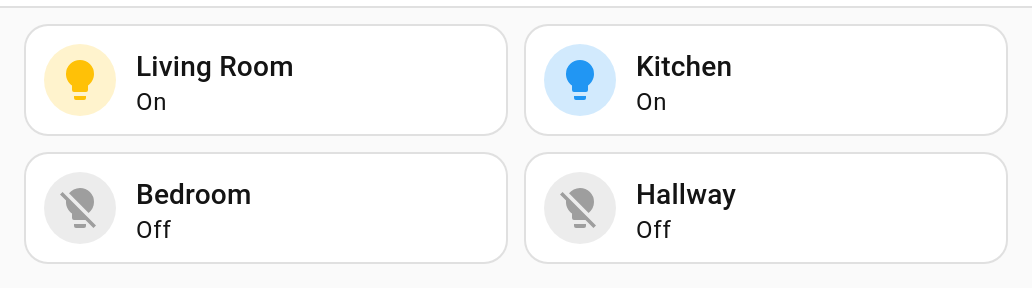
Kitchen sets its own colour; the other three take the one set on the card.
Items
An item is a set of values for one copy. It can carry a nested mapping, and each piece of it can be reached on its own (v1.2.0+) — which is what lets one item hold a room’s light, its sensor and its icon together:
for_each:
  - room: { name: Hall, light: light.hall, icon: 'mdi:lamp' }
content: '[[room.name]] uses [[room.light]]' # and [[room]] is still the whole mapping
Three levels deep. A list is reached whole or not at all.
Each item holds the variables for that copy, written as a mapping — which reads better than a list of one-key entries when every copy sets the same few things:
for_each:
  - entity: light.kitchen
    name: Kitchen
A list of one-key entries works too, if you prefer it to match variables::
for_each:
  - - entity: light.kitchen
    - name: Kitchen
A for_each that is a single mapping rather than a list counts as a list of one, the same
forgiveness variables: gets — and an empty mapping counts as no list at all, so a cleared
field never leaves a stray single-copy stack behind.
Sharing values between copies with variables:
Anything in the card’s own variables: is shared by every copy, and an item can override
it. Above, colour is amber everywhere except the shed.
That is the usual shape: put what is the same in variables:, and what differs in
for_each.
Repeating over what Home Assistant knows (v1.1.0+)
Writing the list out means the dashboard stops being true the moment a lamp is added.
for_each_from asks Home Assistant instead, so the card grows by itself:
type: custom:decluttering-card-plus
template: room_light
columns: 2
for_each_from:
  domain: light
  area: Kitchen
Repeat over entities or over areas, and narrow by domain, area, floor or label.
Each copy is given the things it needs — the entity id, its name, the area it is in — and
the list is worked out again when the registry changes, not on every state change.
A written-out for_each wins over for_each_from if a card somehow has both: it is the
more particular of the two.
Repeating over devices, floors and labels: devices:, floors:, labels: (v1.8.0+)
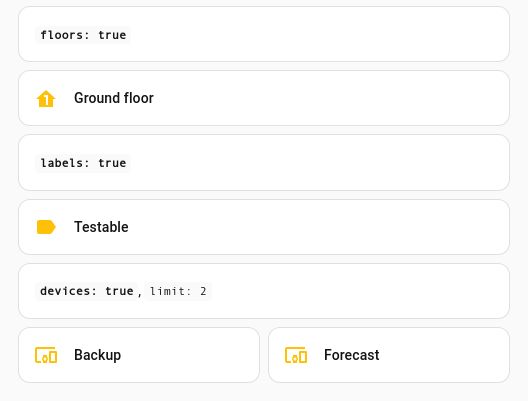
Entities and areas are not the only things worth a card each. The same for_each_from can
repeat over the devices, the floors or the labels Home Assistant knows about:
for_each_from:
  floors: true          # every floor
for_each_from:
  labels: 'outside*'    # labels matching a pattern, by id or by name
for_each_from:
  devices: true
  area: Kitchen         # the narrowing filters work here too
What each copy is given:
| Source | Variables |
|---|---|
devices: |
device_id, device, name, area, area_id, manufacturer, model |
floors: |
floor_id, floor, name, level |
labels: |
label_id, label, name |
All three take with:, the same as an area does, so a copy can carry the entities that
belong to it — a card per floor listing that floor’s lights, say. See
A card per area, listing what is in it for
how with: works.
Home Assistant does not hand the label registry to cards the way it does the others, so the card fetches it once per page to show a label’s name rather than its id (v1.8.0+).
Narrowing what it matches (v1.2.0+)
A sweep that takes everything is rarely what you want. These narrow it, and can be combined:
| Key | Narrows to | Matches by |
|---|---|---|
domain |
entities of a domain | light, binary_sensor, … |
device_class |
entities reporting a device class | motion, door, temperature, … |
integration |
entities from one integration | hue, zha, mqtt, … |
area |
entities in an area | its name or its id |
floor |
entities on a floor | its name or its id |
label |
things carrying a label | its name or its id |
A domain on its own is usually too coarse — nobody wants motion, door and smoke sensors on the same card:
for_each_from:
  domain: binary_sensor
  device_class: motion
A label put on a device counts for all of that device’s entities, which is how labels are normally used.
Leaving things out with exclude:
for_each_from:
  domain: light
  exclude: light.bedside            # a pattern, or a list of them
Written as patterns, exclude means entity ids — which is what it is nearly always for.
Written as a mapping it narrows by anything the source itself can:
for_each_from:
  entities: '*'
  exclude:
    area: Bedroom
    label: hidden
What is left out wins over what is taken in, so “all of these except those” is one line rather than a list of everything you did want.
Order, and how many: sort:, reverse:, limit: (v1.2.0+)
for_each_from:
  domain: light
  sort: area        # name (the default), entity, id, area, domain, floor
  reverse: true
  limit: 5
sort: orders the copies. sort: none keeps the registry’s own order, which is how you
ask for “however Home Assistant listed them”. reverse: turns whichever order you chose
around.
Ordering by what the copies carry (v1.3.0+)
A sort: that is not one of those names is read as a key on the copies themselves, so
anything a repeat hands its template can also order it — including the values a grouped
repeat works out:
for_each_from:
  areas: true
  with:
    domain: light
  sort: entity_count      # the emptiest rooms first
Numbers are compared as numbers, so 2 comes before 10 rather than after it. A copy
that does not carry the key at all counts as empty and sorts to the front, and copies that
tie fall back to the usual name order.
Backwards, and breaking ties (v1.5.0+)
A leading minus turns one key around, and a list of keys sorts by the first and breaks ties with the next:
for_each_from:
  areas: true
  with:
    domain: light
  sort: [floor, -entity_count]   # floor by floor, the busiest room in each one first
reverse: still flips the whole order at the end, tiebreaks and all. The minus is for
turning one key around while the others stay as they are.
Ordering by an attribute with sort: attr: (v1.5.0+)
attr: reads an attribute off the entity’s state rather than a key the copy carries:
for_each_from:
  domain: sensor
  device_class: temperature
  sort: -attr:temperature      # warmest room first
This is a snapshot taken when the card is built, not a live order — the copies will not rearrange themselves as the readings change. An entity without the attribute counts as empty and sorts to the front.
limit: caps how many copies are built. Every copy still carries total — what
matched before the limit — so a card can be honest about what it is not showing:
card:
  type: markdown
  content: 'Showing [[count]] of [[total]] lights'
Splitting one list across two cards with offset: (v1.5.0+)
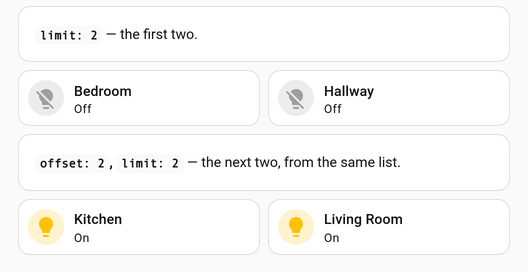
offset: skips the first few copies, so two cards side by side can show different parts of
the same list:
# the left card
for_each_from:
  domain: light
  limit: 10

# the right card
for_each_from:
  domain: light
  offset: 10
  limit: 10
total ignores the window on purpose: every page of a split list says the same “of 23”,
which is the point of splitting it.
Copies that must have a value: require: (v1.5.0+)
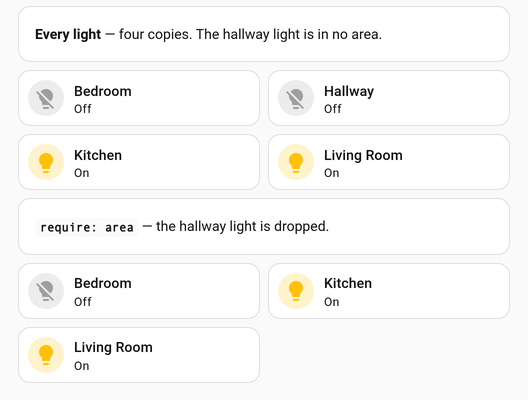
require: names keys a copy has to have filled in. An entity in no area, or an area on no
floor, is dropped:
for_each_from:
  domain: light
  require: area          # or a list - [area, floor]
It runs before anything is counted, so total says what is actually shown rather than what
matched. This is about the values the repeat works out for itself; to drop a copy because a
variable you pass it came out empty, see
Leaving out a copy that has nothing to show.
Different variables for one copy: overrides: (v1.5.0+)
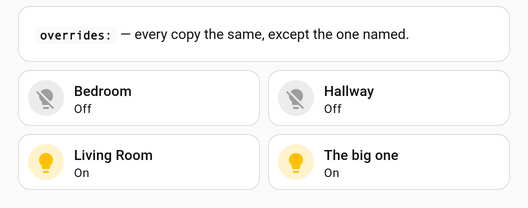
overrides: gives particular copies extra variables without excluding them. The key is an
entity id, an area id, or a pattern:
for_each_from:
  domain: light
  overrides:
    'light.*':
      row: compact
    light.kitchen_ceiling:
      icon: mdi:ceiling-light
      name: The big one
Every pattern that matches is applied in turn, so a specific id can build on a wildcard
above it. Overrides are applied before the copies are filtered and sorted, so one that
changes name also changes where that copy lands in the order.
Repeating a fixed number of times with range: (v1.2.0+)
for_each_from:
  range: 4
Four copies, with nothing but the position to go on. Useful
for a row of slots, or for laying something out before the entities behind it exist.
Asking for range: 0 gives no copies — not, as you might fear, every entity in the house.
When nothing matches: empty: (v1.2.0+)
A repeat that matches nothing renders nothing. That is deliberate — a dashboard should not break because a room has no motion sensor yet — but silence looks the same as breakage, so a card can say so on purpose:
type: custom:decluttering-card-plus
template: motion_tile
for_each_from:
  domain: binary_sensor
  device_class: motion
empty:
  type: markdown
  content: No motion sensors set up yet.
A card per area, listing what is in it (v1.2.0+)
This is the shape people build most: a tile per room, each showing that room’s lights.
with: gathers the entities for each area and hands them to the copy.
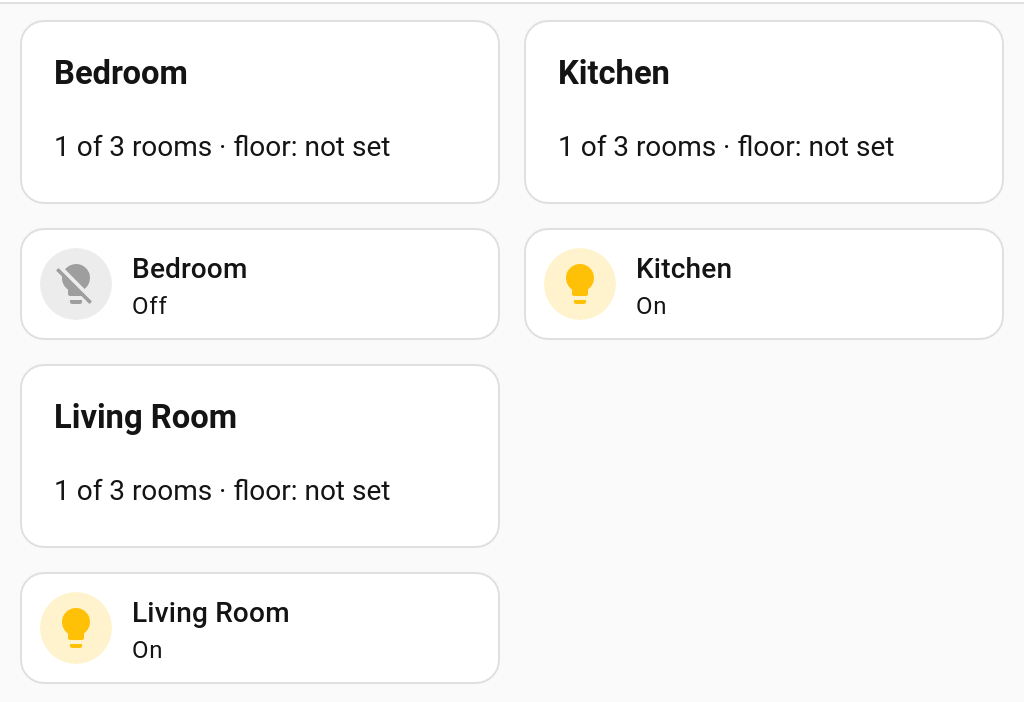
One card. Each copy is an area, and the tiles under it come from a second template repeated over that area’s own entities.
# The outer card - one copy per area.
type: custom:decluttering-card-plus
template: room_summary
for_each_from:
  areas: true
  with:
    domain: light
columns: 3
min_column_width: 240
# The template, which repeats again over what its area holds.
type: custom:decluttering-template-plus
template: room_summary
card:
  type: vertical-stack
  cards:
    - type: markdown
      content: '### [[area]] — [[entity_count]] lights'
    - type: custom:decluttering-card-plus
      template: light_tile
      for_each: '[[items]]'
Each area copy is given, on top of the usual area values:
| Name | Is |
|---|---|
items |
The whole mappings, ready to hand to a nested for_each |
entities |
Just the entity ids, as a list |
entity_count |
How many there are |
The area being grouped always wins over any area: inside with: — that is the point of
grouping.
An area with nothing in it is left out, because a card for a room with no lights is
noise rather than news. with: { keep_empty: true } keeps it, which is how you get to say
“nothing in here” on purpose.
One copy per group: group_by: (v1.8.0+)

group_by: folds a repeat over entities into one copy per distinct value — per domain,
area, floor or label:
for_each_from:
  entities: ['light.*', 'sensor.*_temperature']
  group_by: domain
Each copy is given group (the value it groups on), name, entity_count, and the members
as entities and items — the same shape with: gives an area, so a template written for
one works for the other. An entity with nothing to group on, like one on no floor, is left
out rather than lumped into a group of its own. Grouping by label puts an entity in every
group whose label it carries.
Numbering the copies (v1.1.0+)
Every copy is also given [[index]], counting from one, and [[count]], the number of
copies — so a template can number itself without you writing the number into each item:
card:
  type: markdown
  content: 'Room [[index]] of [[count]]'
An item that sets index or count itself wins, so a template already using those names
for something else keeps working.
Leaving out a copy that has nothing to show (v1.1.0+)
for_each skips an item that leaves a required: true variable empty, which is what lets
one template serve a room with four lights and a room with one:
type: custom:decluttering-template-plus
template: room_light
variables:
  - name: entity
    required: true
card:
  type: tile
  entity: '[[entity]]'
type: custom:decluttering-card-plus
template: room_light
columns: 4
for_each:
  - entity: light.kitchen
  - entity: light.hall
  - entity: ''
  - {}
That renders two cards, not four, with no gaps where the other two would have been. A
template that requires nothing renders every item as before. See
Describing Variables for required.
Layout
columns |
Result |
|---|---|
absent, or 1 |
The copies stack vertically |
2 or more |
The copies are laid out in that many columns |
with min_column_width |
columns becomes the most it will use; a column is dropped rather than going narrower |
Set min_column_width whenever you set columns. Without it the copies keep every column
on a phone, each one squeezed; the card editor points this out (v1.11.0+).
The copies all live inside the one card, so they cannot reflow across a sections view or have a heading and background each. For that, repeat whole sections instead: see Repeating Sections and Badges (v1.11.0+).
The copies are handed to Home Assistant’s own vertical-stack and grid cards, so they
behave exactly like any other card in your layout — including in the
sections layout, and including
visibility conditions on each copy.
What it needs
A repeat only works on a template that defines a card. Home Assistant gives a row, a badge or a picture element a single slot to fill, so there is nowhere for a second copy to go — put what you want repeated inside a card template, and repeat that. Badges are the exception from v1.11.0: a view can repeat them itself, see Repeating Sections and Badges.
for_each needs a template that defines a card. A row, badge or
element has nothing to stack, and asking for one is an error:
for_each needs a template that defines a card
An empty list renders nothing rather than failing the card, so a list you build up over time can start out empty without breaking the dashboard.
A style on the card resolves against the card’s own variables and the
template’s declared defaults, not any one item’s values — per item it would be ambiguous.
In the editor
For a card template, the card editor offers Repeat for each and Columns below the variables.
The missing-variable warning accounts for the items, so a card whose for_each supplies
entity and name is not told they are missing. See
Describing Variables.
When not to use it
If the copies differ by more than a few values — different card types, different
structure — you want separate cards, or a template with
visibility conditions inside it. for_each is for the case where the only
thing that changes is what you pass in.
Reference
| Key | Type | Description |
|---|---|---|
for_each |
list | One copy of the template per item; each item is that copy’s variables. A single mapping counts as a list of one |
columns |
number | How many copies sit side by side. Defaults to 1 |
min_column_width (v1.1.0+) |
number | Pixels. Drops a column rather than going narrower, so one card suits a phone too |
for_each_from (v1.1.0+) |
mapping | What to repeat over, read from Home Assistant instead of written out |
empty (v1.2.0+) |
card | What to render when the repeat produces no copies |
gap (v1.2.0+) |
number | Pixels between the copies. Leave it out for Home Assistant’s own spacing |
Next
→ Using Templates · Describing Variables → Repeating Sections and Badges for a section or badge per item → Recipes for finished examples