Variables
Variables are the holes in a template. You write [[name]] in the template, and pass a
value for name when you use it.
decluttering_templates:
  room_light:
    card:
      type: tile
      entity: '[[light]]'
      name: '[[room]]'
type: custom:decluttering-card-plus
template: room_light
variables:
  - light: light.kitchen
  - room: Kitchen
Writing placeholders
A placeholder is a name in double square brackets: [[light]], [[room]], [[accent]].
When a placeholder is the whole value, quote it.
entity: '[[light]]'     # ✅
entity: [[light]]       # ❌ not valid YAML - "[" starts a list
Inside a longer string, quotes are optional but harmless.
name: '[[room]] light'
title: Lights in [[room]]
Placeholders work anywhere in the content — keys’ values, nested mappings, list items,
even inside CSS in a style block. They are substituted throughout the whole
template body.
Passing values
variables: on the card can be written either way. A list, one name per entry:
variables:
  - light: light.kitchen
  - room: Kitchen
or a single mapping:
variables:
  light: light.kitchen
  room: Kitchen
Both are read the same way, here and in a template’s default:. The list form is what the
visual editor writes, so a card edited there comes out as a list whichever
way you typed it.
Default values: default:
default: on the template supplies fallbacks, so callers only pass what differs.
decluttering_templates:
  area_sensor:
    card:
      type: tile
      entity: '[[entity]]'
      name: '[[label]]'
      icon: '[[icon]]'
    default:
      - label: '[[area]] temperature'
      - area: Living Room
      - entity: sensor.living_room_temperature
      - icon: mdi:thermometer
Used with no variables at all, it renders entirely from the defaults. Override one, and only that one changes:
# 1. nothing passed - pure defaults
- type: custom:decluttering-card-plus
  template: area_sensor

# 2. override the area, and the label follows
- type: custom:decluttering-card-plus
  template: area_sensor
  variables:
    - area: Bedroom
    - entity: sensor.bedroom_temperature

# 3. override the label outright
- type: custom:decluttering-card-plus
  template: area_sensor
  variables:
    - label: Solar output right now
    - entity: sensor.solar_power
    - icon: mdi:solar-power
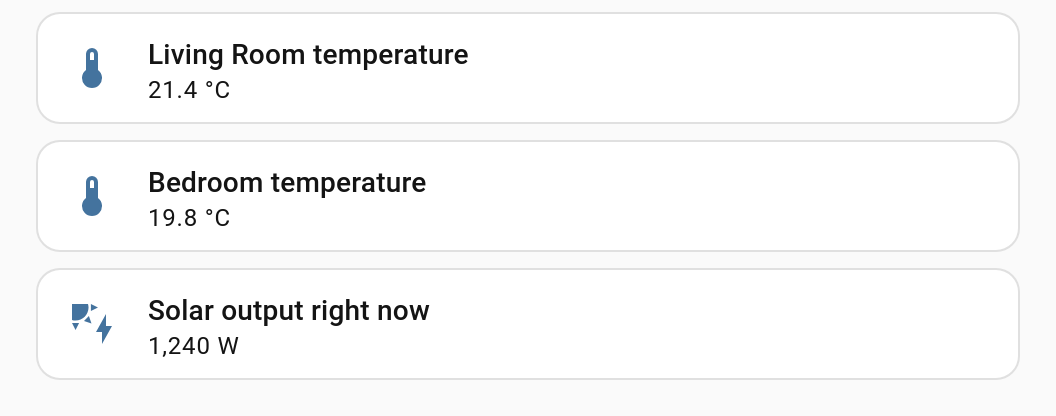
default: uses the same shape as variables: — a list, or a single mapping.
The default values are also what the visual editor uses to draw its
preview, so giving every variable a sensible default makes templates much nicer to work on.
A template can go further and describe each variable — a label, a helper line and a Home Assistant selector — so that cards using it get a real entity picker or dropdown instead of a YAML box, and so the editors can warn about variables that are missing or unused. See Describing Variables.
Defaults that reference other variables
A default can contain placeholders of its own. Above, label defaults to
'[[area]] temperature', so changing area changes the label without the caller ever
mentioning label.
Substitution repeats until nothing is left to replace, so the order you declare them in does not matter, and a value you pass always beats a default — including when the placeholder only appears because of an earlier substitution.
This also gives you “fall back to another variable”:
default:
  - title: '[[name]]'      # if no title is given, use the name
  - name: Sensor
Loops
A variable that refers to itself can never be resolved. Substitution gives up after 10 passes and logs a warning to the browser console rather than hanging:
decluttering-card-plus: gave up substituting variables after 10 passes.
Check whether a variable refers to itself.
Ten passes is far more than any sane template needs — chains that deep are fine, cycles are not.
Values the template works out for itself: let: (v1.7.0+)
let: is for a value the template needs in several places and nobody outside it should
have to know about. Write the chain once, use the name everywhere:
my_room_card:
  let:
    room_slug: '[[room|slug]]'
    motion: 'binary_sensor.[[room_slug]]_motion'
  card:
    type: tile
    entity: 'light.[[room_slug]]'
    name: '[[room]]'
A card using this passes room: Living Room and gets light.living_room and
binary_sensor.living_room_motion without either of them appearing in its configuration.
One let: can build on another, as motion does above. The difference from a default: is
who owns it: a card cannot override a let:. A default is a fallback the caller may
replace, while a let: is template internals — passing room_slug: from a card changes
nothing, which is the point of it.
Asking for a variable in a different shape
A placeholder can ask for its value written differently, which lets one variable serve both a room’s name and the entity id built from it:
decluttering_templates:
  room_tile:
    card:
      type: tile
      entity: 'light.[[room|slug]]'
      name: '[[room|title]]'
    default:
      - room: Back Garden
light.[[room|slug]] becomes light.back_garden, and [[room|title]] becomes
Back Garden. Pass room: John's Shed and you get light.john_s_shed without the caller
ever mentioning the entity id.
| Transform | Does | John's Back Garden becomes |
|---|---|---|
slug |
Lower case; anything that is not a letter or digit becomes _ |
john_s_back_garden |
upper |
Upper case | JOHN'S BACK GARDEN |
lower |
Lower case | john's back garden |
title |
Capitalises each word | John's Back Garden |
kebab |
Lower case; anything that is not a letter or digit becomes - |
john-s-back-garden |
Transforms chain, left to right: [[room|slug|upper]] gives JOHN_S_BACK_GARDEN. Order
matters, since slug lower-cases first — [[room|upper|slug]] gives john_s_back_garden.
Tidying up text somebody typed (v1.3.0+)
Two more are for values that came from a person rather than from Home Assistant — an
input_text, a name filled in by hand, something pasted from elsewhere.
| Transform | Does | ` living room ` becomes |
|---|---|---|
trim |
Removes the whitespace at both ends | living room |
capitalize |
Upper-cases the first character and leaves the rest alone | ` living room ` |
capitalize looks like it does nothing there, and on its own it does: the first character
is a space. That is why the two are usually chained — [[room|trim|capitalize]] gives
Living room.
capitalize is not title. title capitalises every word, which is what a label wants
and a sentence does not: [[room|trim|title]] gives Living Room, and
[[room|trim|capitalize]] gives Living room.
Transforms that take an argument (v1.4.0+)
The transforms above each do one fixed thing. Five more take an argument, written after a
colon the way attr: is:
| Transform | Does | Written | living_room_lamp becomes |
|---|---|---|---|
replace |
Swaps every occurrence of one piece of text for another | replace:_: |
living room lamp |
prefix |
Puts text in front | prefix:light. |
light.living_room_lamp |
suffix |
Puts text after | suffix: 2 |
living_room_lamp 2 |
max |
Shortens a long value, ending it with … |
max:12 |
living_room… |
map |
Looks the value up in a list of pairs | map:lamp=Lamp |
see below |
The argument runs to the end of the step, so it can hold spaces and colons of its own —
[[room|replace:_: ]] reads as “underscores to spaces”, trailing space included. It cannot
hold a bar or a closing bracket, because those end the step and the placeholder.
replace takes from:to. Leave the to off and it deletes rather than swaps, so
[[room|replace:_]] turns living_room into livingroom. The from is whatever comes
before the first colon of the argument, which means it cannot itself be a colon.
prefix and suffix decorate a value rather than supply one, so a gap stays a gap. An
empty name under [[name|suffix: sensors?]] is still empty, so the optional marker drops
the key rather than leaving a stray ` sensors behind, and default:` still sees nothing to
stand in for.
max keeps a long name from wrapping a tile. The … takes the last kept character’s place,
so the result is never longer than the number asked for: [[name|max:10]] on
Kitchen temperature gives Kitchen t…, ten characters, ellipsis included. A length that is
not a positive number leaves the value alone.
map turns a value into something a card option will actually accept — a colour, a label, an
icon name:
decluttering_templates:
  level_tile:
    card:
      type: tile
      entity: '[[entity]]'
      color: '[[level|map:low=green,high=red]]'
Pairs are from=to, separated by commas. A value no pair names leaves the placeholder
visible rather than passing something through that color would choke on — write *=grey
to say “and anything else”. A named pair beats the star wherever it is written, so
map:*=grey,low=green still gives green for low.
These chain like any other transform, and run in the order written:
[[room|replace:_:-|upper]] gives LIVING-ROOM.
One thing to know about the optional marker. Because the argument runs to the end of the
step, a ? written against the closing brackets is read as the marker rather than as the
last character of the argument — [[who|prefix:Mr ?]] is an optional who with Mr in
front, not a prefix of Mr ?. The marker wins everywhere, which is the reading that keeps
? meaning one thing throughout.
The same variable can be used raw and transformed in the same template.
A transform is a way of writing a value out, not a way of choosing it, so a transformed placeholder is always text. That makes it a tool for scalars: a number transforms as its digits, but a mapping or a list under a transform is left unsubstituted — slugging or uppercasing its JSON would only garble it, so the placeholder stays visible instead.
Only those twelve are transforms. A word after the bar that is not one of them is not recognised, so nothing is substituted and you are left looking at
[[room|shout]]in the card. That is deliberate: a silent empty string would be far harder to spot. The same goes for a chain: one unknown word in it leaves the whole placeholder alone rather than applying half of it.
Asking Home Assistant for a value (v1.1.0+)
A placeholder can also ask Home Assistant about the entity it names, which is what lets a template default a name to the entity’s own name rather than making every card pass one:
decluttering_templates:
  room_tile:
    card:
      type: tile
      entity: '[[entity]]'
      name: '[[entity|friendly_name]]'
| Asks for | Gives | Read from |
|---|---|---|
friendly_name |
What the entity is called | Its friendly_name, then the name you gave it, then its original name |
area |
The name of the area it is in | Its own area, or its device’s |
floor (v1.2.0+) |
The name of the floor that area is on | The area’s floor |
device |
The name of its device | The name you gave the device, then the device’s own |
area_id (v1.2.0+) |
The area’s id rather than its name | Its own area, or its device’s |
device_id (v1.2.0+) |
The device’s id | The entity’s registry entry |
attr:<name> |
One named attribute | The entity’s current attributes |
domain (v1.7.0+) |
The half before the dot — light, sensor |
The entity id itself |
object_id (v1.7.0+) |
The half after the dot | The entity id itself |
labels (v1.7.0+) |
The labels it carries, comma separated | Its own labels, and its device’s |
The two _id ones are for building rather than showing. A name is what you put on a card;
an id is what you put in another entity id:
domain, object_id and labels (v1.7.0+)
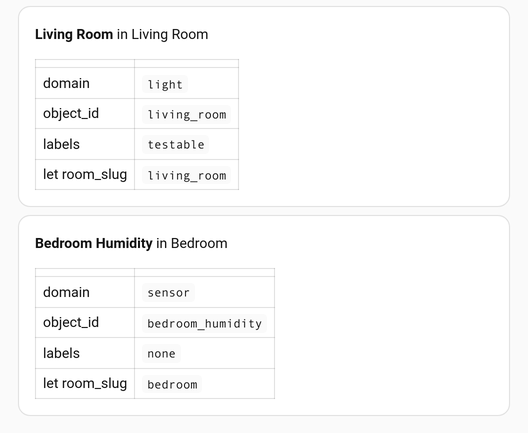
domain and object_id split an entity id without any string handling:
[[entity|domain]] on light.kitchen_ceiling is light, and [[entity|object_id]] is
kitchen_ceiling. Both chain like any other step, so [[entity|object_id|upper]] reads
KITCHEN_CEILING, and [[entity|object_id|replace:_: |title]] reads “Kitchen Ceiling” —
title on its own capitalises the first letter and leaves the underscores where they are.
Anything that is not an entity id — a bare word, an empty value — resolves to nothing, and
the placeholder is left alone rather than filled with rubbish.
labels gives the labels the entity carries, its own and its device’s, comma separated and
in the order Home Assistant lists them. An entity with no labels resolves to nothing, so pair
it with a default when it is going on a card:
card:
  type: markdown
  content: '[[entity|object_id|title]] — [[entity|labels|default:unlabelled]]'
card:
  type: tile
  entity: 'binary_sensor.[[entity|area_id]]_motion'
  name: 'Motion in [[entity|area]]'
These chain with the transforms above and run in the order written, so
[[entity|friendly_name|slug]] is the entity’s name slugged. The value a resolver reads is
an entity id, so it has to come first: [[entity|slug|friendly_name]] would slug the id
and then go looking for an entity by that name.
The entity’s state is deliberately not here. A card’s configuration is built once, so resolving state would mean rebuilding the whole card every time anything changed. What is here comes from the registry, which changes about as often as the dashboard does — and a template that uses it is rebuilt when it does, so a name that was not known yet when the page first painted still turns up.
When Home Assistant has nothing to give — an entity that does not exist, an attribute it does not carry, no area on it — the placeholder is left in the card and the browser console says which and why.
Standing in for what nothing set: |default: (v1.2.0+)
A placeholder can say what to do when nothing gives it a value, rather than rendering its own brackets:
name: '[[name|default:Unnamed]]'            # this text instead
name: '[[name|or:label]]'                   # try another variable
name: '[[name|or:label|default:Unnamed]]'   # try, then give up gracefully
default: supplies the text itself. or: names another variable to try. Both chain with
each other and with the transforms, so the last word is always something:
# The name you passed, or the entity's own name, or the word Unnamed - titled either way.
name: '[[name|or:entity|friendly_name|default:Unnamed|title]]'
A gap is unset, null, or an empty string. A 0 and a false are values and keep
their place — [[count|default:none]] with count: 0 gives 0, not none.
A stand-in also rescues a resolver that found nothing, which is the tidiest way to handle an entity that is not in an area:
content: 'In [[entity|area|default:no area]]'
or: supplies words, not structure. If the variable it names holds a mapping or a list,
it is not used — reach for json if that is what
you want.
How this differs from ?
They answer different questions. [[name?]] removes the key from the card entirely, which
is right for an option that should not be there at all. default: puts something in its
place, which is right when the card should still show something.
Putting a mapping in on purpose (v1.2.0+)
Every transform shapes text and refuses anything else, so a variable holding a mapping or a
list normally cannot go through one at all. json is the exception — it is the one step
that takes the value as it is:
default:
  - tap: { action: toggle }
card:
  type: markdown
  content: 'Tapping does `[[tap|json]]`'   # Tapping does {"action":"toggle"}
Without it, [[tap|upper]] is left visible and
says why in the console — uppercasing a
mapping’s JSON would only garble its keys.
A variable the template can do without (v1.1.0+)
A placeholder written [[name?]] is one the card can manage without. When nothing gives it
a value, the option it stands for is taken out of the card altogether rather than left
showing the brackets:
decluttering_templates:
  room_tile:
    card:
      type: tile
      entity: '[[entity]]'
      name: '[[name?]]'
Pass a name and the tile uses it. Leave it out and the tile has no name key at all, so
Home Assistant falls back to the entity’s own name — usually what you wanted.
Empty means unset, null, or the empty string. A 0 and a false are values and stay.
Inside a longer piece of text it simply leaves quietly, and an item of a list that is
nothing but an empty option is dropped rather than leaving a hole. It is not a mistake, so
nothing is said about it in the console.
The marker goes at the end, after any transform: [[room|slug?]]. That holds for a
transform that takes an argument too — a ? written against the closing brackets is the
marker, not the last character of the argument.
Writing [[ and meaning it (v1.1.0+)
A placeholder written [[!name]] is not a variable: it renders as the literal text
[[name]]. That is the only way to put those brackets in a template — worth knowing if
yours holds markdown, or Jinja that uses them.
card:
  type: markdown
  content: 'Write [[!entity]] to use a variable.'
The bang is dropped only once every other substitution is done, so an escaped placeholder
can never be turned back into a real one. The editors know about it too, and will not tell
you that [[!entity]] is a variable you forgot to set.
Value types
How a value is substituted depends on where the placeholder sits.
The placeholder is the entire value
The type is preserved. Numbers stay numbers, booleans stay booleans, and mappings and lists are inserted as structure.
decluttering_templates:
  sized_tile:
    card:
      type: tile
      entity: '[[entity]]'
      name: '[[name]]'
      grid_options:
        columns: '[[cols]]'      # whole value
        rows: 1
variables:
  - cols: 12                     # inserted as the number 12, not "12"
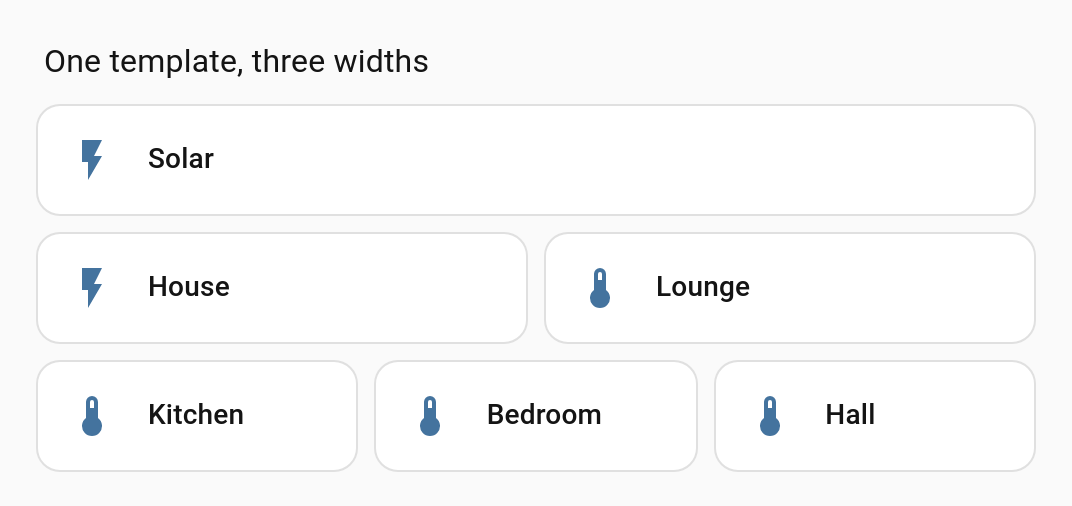
This matters: columns: "12" would be a string and Home Assistant would ignore it.
The same applies to structures:
card:
  type: tile
  entity: '[[entity]]'
  features: '[[features]]'
variables:
  - features:
      - type: toggle
      - type: light-brightness
and to booleans and null:
variables:
  - show_name: true
  - icon: null
The placeholder is part of a longer string
The value is inserted as text.
name: '[[room]] light'
With room: Kitchen this becomes Kitchen light. A mapping or list used this way is
inserted as its JSON text, which is occasionally useful and usually not what you want.
Awkward characters are handled
Values containing quotes, backslashes, newlines or tabs are escaped correctly. So multi-line values and Jinja templates work:
variables:
  - message: >-
      Line one
      Line two
  - jinja: ""
Values containing $& or $1 are inserted literally rather than being interpreted as
replacement patterns, and variable names containing regex characters are matched
literally too.
Unresolved placeholders
If a placeholder has no matching variable and no default, it is left in place. You will
see the literal text [[light]] in the rendered card, or Home Assistant complaining about
an unknown entity called [[light]].
That is the number one symptom of a typo in a variable name. See Troubleshooting.
The card says so in the browser console (v1.1.0+), naming the template and every variable still standing:
decluttering-card-plus: template "room_tile" uses [[light]], which nothing gives a value
to, so it is rendered as written. Set it on the card, or give it a default in the
template. To write those brackets on purpose, escape it as [[!light]].
An escaped [[!light]] and an optional [[light?]] are not mistakes, so neither is
reported.
You will also see this in the visual editor while editing a template — the card editor there is looking at the raw template, so it reports
[[light]]as an unknown entity. That is expected and harmless.
Reference
| Where | Example | Result |
|---|---|---|
| Whole value, string | entity: '[[e]]' with e: light.x |
light.x |
| Whole value, number | columns: '[[c]]' with c: 12 |
12 (number) |
| Whole value, boolean | show: '[[s]]' with s: true |
true (boolean) |
| Whole value, mapping/list | features: '[[f]]' |
inserted as structure |
Whole value, null |
icon: '[[i]]' with i: null |
null |
| Inside a string | name: '[[r]] light' with r: Hall |
Hall light |
| No such variable | entity: '[[nope]]' |
left as [[nope]] |
| Transform | Example | Result |
|---|---|---|
slug |
'light.[[r|slug]]' with r: Back Garden |
light.back_garden |
upper / lower |
'[[r|upper]]' with r: Hall |
HALL |
title |
'[[r|title]]' with r: back garden |
Back Garden |
kebab |
'[[r|kebab]]' with r: Back Garden |
back-garden |
trim (v1.3.0+) |
'[[r|trim]]' with r: ' Hall ' |
Hall |
capitalize (v1.3.0+) |
'[[r|capitalize]]' with r: hall light |
Hall light |
| Chained | '[[r|slug|upper]]' with r: Back Garden |
BACK_GARDEN |
| Not a transform | '[[r|shout]]' |
left as [[r|shout]] |
| Asking Home Assistant (v1.1.0+) | Example | Result |
|---|---|---|
friendly_name |
'[[e|friendly_name]]' |
the entity’s name |
area / device |
'[[e|area]]' |
the area or device name |
attr:<name> |
'[[e|attr:brightness]]' |
that attribute |
| Nothing to give | '[[e|area]]' with no area |
left as [[e|area]] |
| Standing in (v1.2.0+) | Example | Result |
|---|---|---|
| Text instead | '[[n\|default:Unnamed]]' |
Unnamed when n is unset, null or empty |
| Another variable | '[[n\|or:label]]' |
the value of label |
| Chained | '[[n\|or:label\|default:x\|title]]' |
the first of those that has a value, titled |
| A mapping as text | '[[tap\|json]]' |
{"action":"toggle"} |
| Optional and escaped (v1.1.0+) | Example | Result |
|---|---|---|
| Optional, unset | name: '[[n?]]' |
the name key is removed |
| Optional, set | name: '[[n?]]' with n: Hall |
Hall |
| Escaped | content: '[[!n]]' |
the text [[n]] |
| Shape | Read as |
|---|---|
- light: light.x per line |
one variable per entry |
light: light.x in a mapping |
one variable per key |
| An entry with several keys | one variable per key |
| Precedence | Winner |
|---|---|
variables on the instance vs any default |
variables |
a section’s decluttering_defaults vs its view’s (v1.10.0+) |
the section’s |
a view’s decluttering_defaults vs any template default (v1.9.0+) |
the view’s |
default inside a declaration vs the default: list |
the declaration |
the default: list vs the dashboard’s decluttering_defaults |
the default: list |
| Same key twice in one list | the first one |
Next
→ Describing Variables to give them labels, pickers and warnings → Repeating a Template to render one template once per item → Cards · Badges · Rows · Elements → Recipes for finished examples