Reading the Debug Report (v2.9.0+)
debug: report puts a panel under
a card with everything about how it was built, ready to copy into an issue or a forum post.
That page covers what goes into the report and what is taken out of it. This one covers the
panel itself: an outline of what built what (v2.10.0+), the warnings first, a tree to fold
and search, a box to try a placeholder against the build, and an issue form filled in for you.
type: custom:decluttering-card-plus
template: report_tile
debug: report
for_each:
  - entity: light.kitchen
    room: kitchen
  - entity: light.hallway
    room: hallway
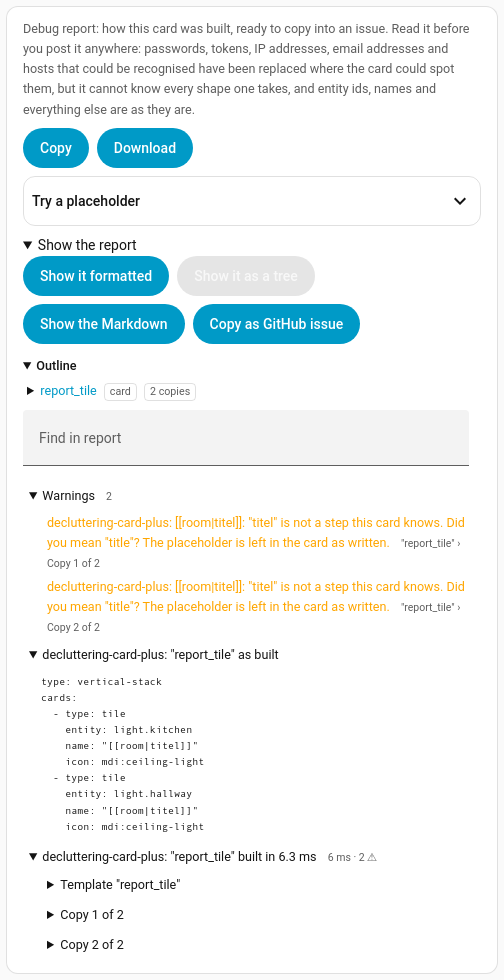
A misspelt step in a repeat of two, shown as a tree: both copies warn, and the warnings come straight after the outline.
On this page:
- The outline
- The warnings come first
- Three ways to read it
- Try a placeholder in the report
- Copy as GitHub issue
- Folding or switching reports off
The outline (v2.10.0+)
A card that builds other things, a nested card of ours, a with: or a
repeat:, or copies from for_each, makes a long report, and the part you are
after can be a long way down. The report now opens with an outline: one line for the card,
then one for each card of ours inside it and each with: and repeat: fill, nested as they
sit.
decluttering_templates:
  light_row:
    item:
      entity: '[[entity]]'
  room_tile:
    card:
      type: tile
      entity: '[[entity]]'
  room_panel:
    default:
      - heading: '[[room]] lights'
    card:
      type: vertical-stack
      cards:
        - type: custom:decluttering-card-plus
          template: room_tile
          variables:
            - entity: '[[thermostat]]'
        - type: entities
          title: '[[heading]]'
          entities:
            - '[[light_row|repeat:lights]]'
            - '[[light_row|if:night|with:entity=light.reading_lamp?]]'
type: custom:decluttering-card-plus
template: room_panel
debug: report
variables:
  - room: Downstairs
  - thermostat: climate.cd_thermostat
  - night: false
  - lights: [light.living_room, light.kitchen, light.hallway]

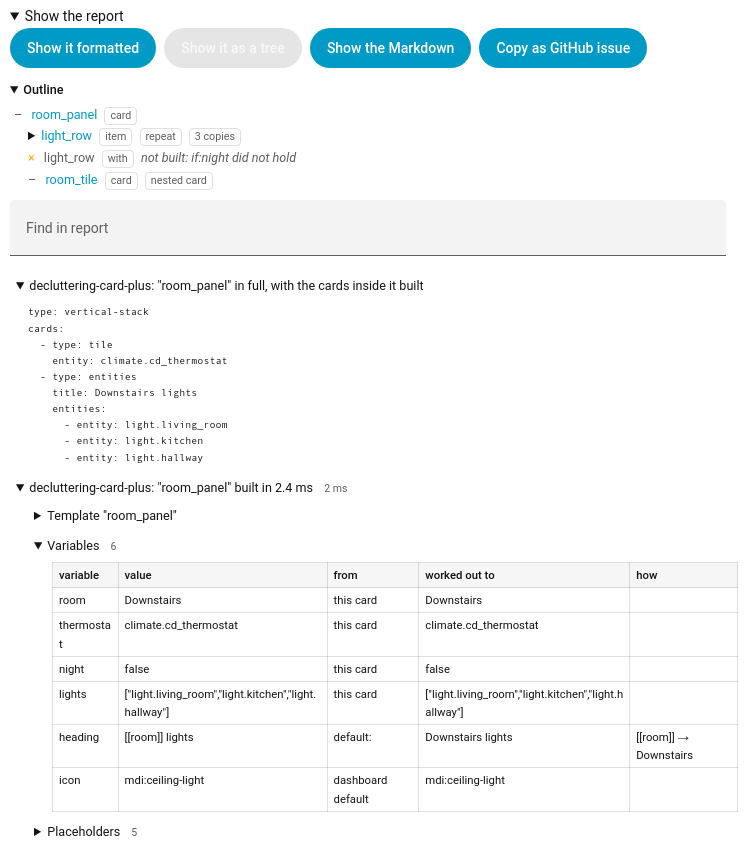
Each line says what was made, what it came from (a card, a badge, an item template or a
variable, with the template’s name when that is not the name shown) and what built it: a
with:, a repeat:, or a nested card. A repeat’s copies fold under one line that says how
many. A fill that was never made is listed too, struck through in the formatted view, with
the reason: its if: did not hold, or there is no item template or variable by that name. A
copy its own if:...? left out is listed as well. Above, night is false, so the reading lamp’s row was never built, and
the outline says so instead of leaving you to wonder where it went.
Click a name to go to that part of the report: its folds open and it scrolls into view, in the tree and in the formatted view. The Markdown that Copy and Download give has the same outline as a list of links, and the links work once the report is pasted on GitHub.
A card that builds nothing inside it, with no fills and no copies, has no outline.
The warnings come first (v2.9.0+)
Every warning any build in the report gave is listed at the top, before the card as built and before any build is unfolded, each with the build it came from: “report_tile” › Copy 2 of 2. Before v2.9.0 a warning sat inside the build that gave it, folded away, and a report with twenty builds hid the one line that mattered. The Markdown text has the same list at the top, so it reaches whoever you send it to as well.
When a template’s checks: fail, a Failed checks list comes before
the warnings, with each check’s level, message and the build it failed in. A check at level
info is said in the browser console only, and is not listed.
Three ways to read it (v2.9.0+)
Under Show the report:
- Show it formatted is the report as GitHub will show it once pasted.
- Show it as a tree has the outline, the warnings and the card as built open; each build is a node you fold open, with its template, its variables, its placeholders and what each became, what was taken out, its own warnings and its result, each a node of its own with a count beside it. A build’s node says how long it took and how many warnings it gave.
- Show the Markdown is the text that Copy and Download give you.
(v2.10.0+) The report opens formatted again, as it did before v2.9.0, when it opened as a
tree. The tree draws the variables, the placeholders and each item template’s fill as tables,
with the same columns as the formatted report, so a variable shows where its value came from,
what it worked out to and how: heading below came from the template’s default: as
[[room]] lights, and worked out to Downstairs lights by way of [[room]] → Downstairs.
In v2.9.0 the tree gave each variable one line, without those columns. A column heading now
wraps only between words.
Find in report
The tree has a Find in report box. Type part of a name, a value or an entity id and the tree narrows to the nodes that mention it, every one opened so the hits are in view, with a count of the matches. (v2.10.0+) The count is the number of places highlighted, so a table with three hits counts three; before, it counted the nodes. Nothing in the report mentions that. means just that: the value never reached any build, which is often the answer.
Try a placeholder in the report (v2.9.0+)
|  |
The report says what each placeholder became. When the question is what a different one would have become, Try a placeholder at the top of the panel answers it without editing the card. It is the template editor’s tool, fed by the build rather than an example:
- Read it in picks the build: the card itself, or each copy when it repeats, each card
built inside it, and each
with:orrepeat:fill of an item template. The same name can mean something different in each, which is often the very thing being chased. - Placeholder offers each of that build’s variables and every placeholder it met, or type your own. The chips under it add a step.
- The table shows what each step handed to the next and where the value came from, and the last row the result and what kind of value it is. A step that refuses what it is given stops the chain and says why.
It reads Home Assistant as it is now, not as it was when the card built, so a state may have
moved on since. Anything the report would take out is taken out here too, unless the card has
redact: false.
Copy as GitHub issue (v2.9.0+)
Copy as GitHub issue opens a new bug report on the project’s GitHub in a new tab, with the form filled in from the report: the versions, the template, the card as built, the warnings and the whole report. Nothing is sent: the form is yours to read, finish and submit, and it still needs saying what you expected and what you saw instead.
A long report does not fit in a web address. Then the panel puts the report on the clipboard, the form opens with the rest filled in, and it says where to paste it.
Cards that refused their config (v2.12.0+)
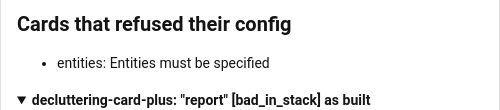
The template can build without a fault and still leave a card that does not work: a card in what it built may refuse the config it was given, such as a tile with no entity, or a custom card that rejects one of its options. Home Assistant puts its own Configuration error card in that card’s place. The report lists every one of them under Cards that refused their config, with the card’s type and what it said:
## Cards that refused their config

- custom:advanced-camera-card: invalid configuration: ['view.actions']
They are looked for once the card has built, and again when a card inside builds late, such as a custom card that loads after the dashboard. See Troubleshooting for showing the message on the dashboard itself.
The card as written, recent rebuilds and checks that passed (v3.0.0+)
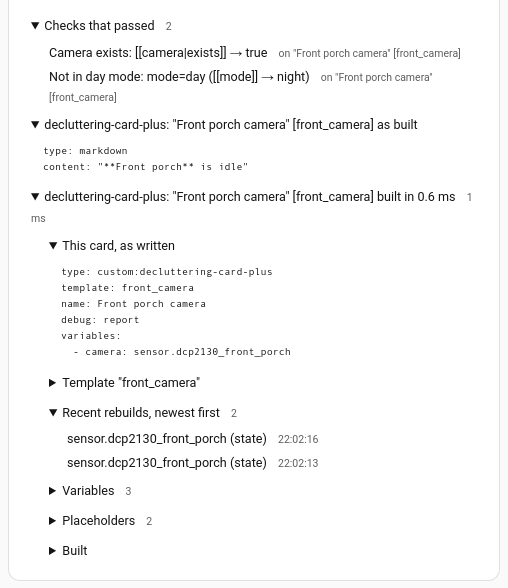
Three more things go into the report, so a report sent to someone else answers the questions they would ask first.
This card, as written comes before the template: the card’s own variables:, rebuild_on: and the rest, exactly as they are in the dashboard, redacted like everything else in the report.
Recent rebuilds, newest first lists the last ten times the card built again because a rebuild_on entity moved, with the time and what moved: the entity, and which part of it. That is its state; last_updated when something other than the state changed, which means an attribute; an attribute by name, such as attr:camera_name, for an entry that lists it under watch:; or that the entity appeared or was gone. A burst of changes that lands in one rebuild is one line with everything in it. The console says the same as each rebuild happens:
decluttering-card-plus: "Front porch camera" [front_camera] rebuilt because camera.front_porch (last_updated) changed
That is usually how a card that seems to rebuild for no reason gets explained: an attribute the card never reads changes every few minutes, such as a camera’s access token. rebuild_on_watch is the fix. The list is only kept while the card has debug: set, so a card without it does none of this work.
Checks that passed comes after the failed ones, folded, with each check’s name and its condition. It’s there to rule things out: a check that passed is not why the card looks wrong.
The rebuild_on watch dropdown in the card editor also says “except entries that say their own” when an entry in the card’s rebuild_on: has its own watch:, since that entry keeps its own whatever the dropdown says.
Folding or switching reports off (v2.12.0+)
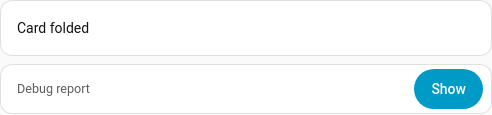
A page with a report under every card gets long. Hide at the top of the panel folds the
report to a one-line bar, and Show on the bar opens it again. Set report_open: false and
the report starts folded. While it is folded the report is not written out, which saves the
work on a page with many of them; the card still traces its build, so opening it later shows
the whole report.
To switch every report on a page on or off at once, point the cards at one entity, such as an
input_boolean helper:
type: custom:decluttering-card-plus
template: camera_tile
debug: report
report_entity: input_boolean.debug_reports
While that entity is off, the report is not shown and the card sits on the page as it would
without one. Any other state shows it, including an entity that is missing or unavailable, so a
typo cannot hide a report without you noticing. Flipping it only shows or hides the panel; the
card is not built again.