Pool Mode (Savings Jars)
Available in: v3.0.0+ Status: Opt-in (per-reward or per-card) Breaking changes: None
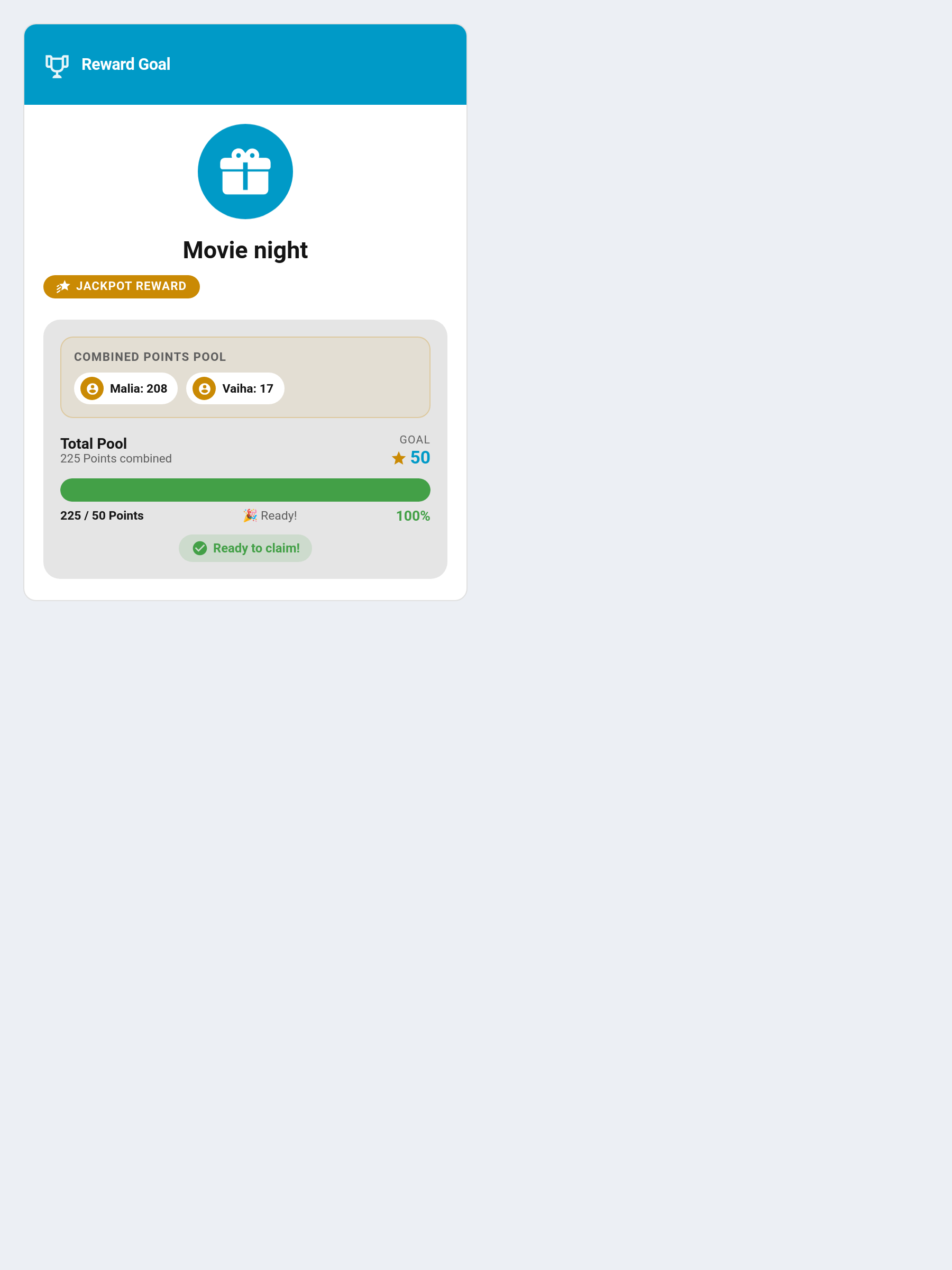
Pool Mode transforms individual rewards from a "shared wallet" model into dedicated savings jars. Instead of every progress bar moving together when a child earns points, the child manually deposits points into one specific reward's jar.
Wallet-mode rewards (the classic 2.x behaviour) and pool-mode rewards can coexist on the same card, so short-term treats and long-term goals live side by side.
Why use Pool Mode?
- Clear mental model for kids — each progress bar represents dedicated effort toward one specific goal
- Teaches savings & commitment — allocated points are locked; they can't be moved back once deposited
- Eliminates mental math — children see "I have 12 spendable, my LEGO jar has 22/50" rather than calculating how spending 10 on candy delays the LEGO goal
- Mixed cards — one rewards card can show a 10pt candy (wallet, instant-buy) and a 500pt LEGO (pool, savings goal)
Concepts
| Term | Meaning |
|---|---|
Gross balance (child.points) |
Points the child holds after deposits have been subtracted |
| Spendable balance | Gross balance minus points committed to pending claims |
| Allocated points | Total the child has deposited across all pool-mode rewards |
| Pool / allocation | Points a specific child has deposited into a specific reward |
| Redeem | Once a pool is 100 % full, the child taps Redeem to request the reward |
Enabling Pool Mode
Recommended: per reward (TaskMate panel → Rewards)
- Open the TaskMate panel → Rewards
- Add a new reward, or edit an existing one
- Tick "Pool Reward (Savings Jar)"
- Save
Rewards without the toggle continue in wallet mode. On the same card, pool rewards will show deposit buttons while wallet rewards still show the Claim button.
Per-card override
Add enable_pool_mode: true to a rewards-card YAML to force every reward displayed on that card into pool mode, regardless of the per-reward flag. Useful for a single-purpose "savings goals" dashboard.
type: custom:taskmate-rewards-card
entity: sensor.taskmate_overview
child_id: <child_id>
enable_pool_mode: true
The workflow
- Earn — Child completes chores, their spendable balance grows
- Deposit — Child taps a quick-deposit button (
[+1],[+5],[+10]by default) on a specific reward, or types any value into the Amount field for larger goals. The deposit immediately moves from spendable to that reward's allocation. - Save — Deposits accumulate in the pool. Spendable balance drops; the targeted reward's bar grows; other rewards are untouched.
- Redeem — When the pool hits 100 %, an animated green Redeem button appears. Tap it to create a pending claim.
- Approve — Parent approves via the TaskMate Approvals card. The allocation clears; the reward is granted.
Customising the deposit buttons
The quick-deposit buttons default to [+1], [+5], [+10]. Set the Rewards card's deposit_amounts option to change them — handy for high-value goals:
type: custom:taskmate-rewards-card
entity: sensor.taskmate_overview
deposit_amounts: [10, 50, 100]
The free-form Amount field is always available regardless of the quick buttons, and any deposit is capped to the child's spendable balance and the pool's remaining room.
Multi-child cards
Pool Mode requires an active child to attribute deposits. Two common setups:
One card per child
Recommended. Give each child their own rewards card with child_id: set to their own ID. Progress and deposit buttons show only for that child.
Jackpot rewards for shared goals
For community savings goals (a family pizza night), create a reward with Is Jackpot enabled — jackpots are always pool-mode, so there's no separate Pool toggle to set (the editor hides it). Each assigned child has their own deposit buttons; the combined pool fills as children contribute. Any assigned child can tap Redeem when the pool fills; on approval each contributing child loses only their own share. This is how a goal no single child could afford is reached together.
Behaviour details
Allocations are locked
There is no withdrawal. Once deposited, points stay in the pool until redeemed. This is by design — the feature is explicitly about commitment to a saved goal.
Rejecting a claim does not refund
If a parent rejects a pool-mode Redeem, the allocation stays full and the child can tap Redeem again. This models "not right now, ask me again later", not "cancel the goal". To permanently cancel a pool, the parent must delete the reward (which clears allocations without refunding points).
Deposit amounts are silently capped
A deposit is capped at whichever is lowest:
- The requested amount (+1, +5, +10)
- The child's current spendable balance
- The pool's remaining capacity (reward.cost − already_allocated)
No error is shown — you just get less than requested, if less was available.
Tooltips explain disabled buttons
Hover a greyed-out deposit button to see why:
| Tooltip | Meaning |
|---|---|
| "Select a child to deposit" | Card has no child_id and no child is selected |
| "Not enough spendable (X available)" | Spendable balance is below the deposit amount |
| "Depositing…" | Previous deposit is still in flight |
Backward compatibility
Rewards without pool_enabled: true continue to behave exactly as in v2.4.x. No migration runs unless you actually make pool allocations. All existing card configs remain valid.
Related
- Managing Rewards — the admin form
- Services — the
taskmate.allocate_points_to_poolservice - Sensor Attributes — new pool-related fields
- FAQ — common questions