Children
Managing Children
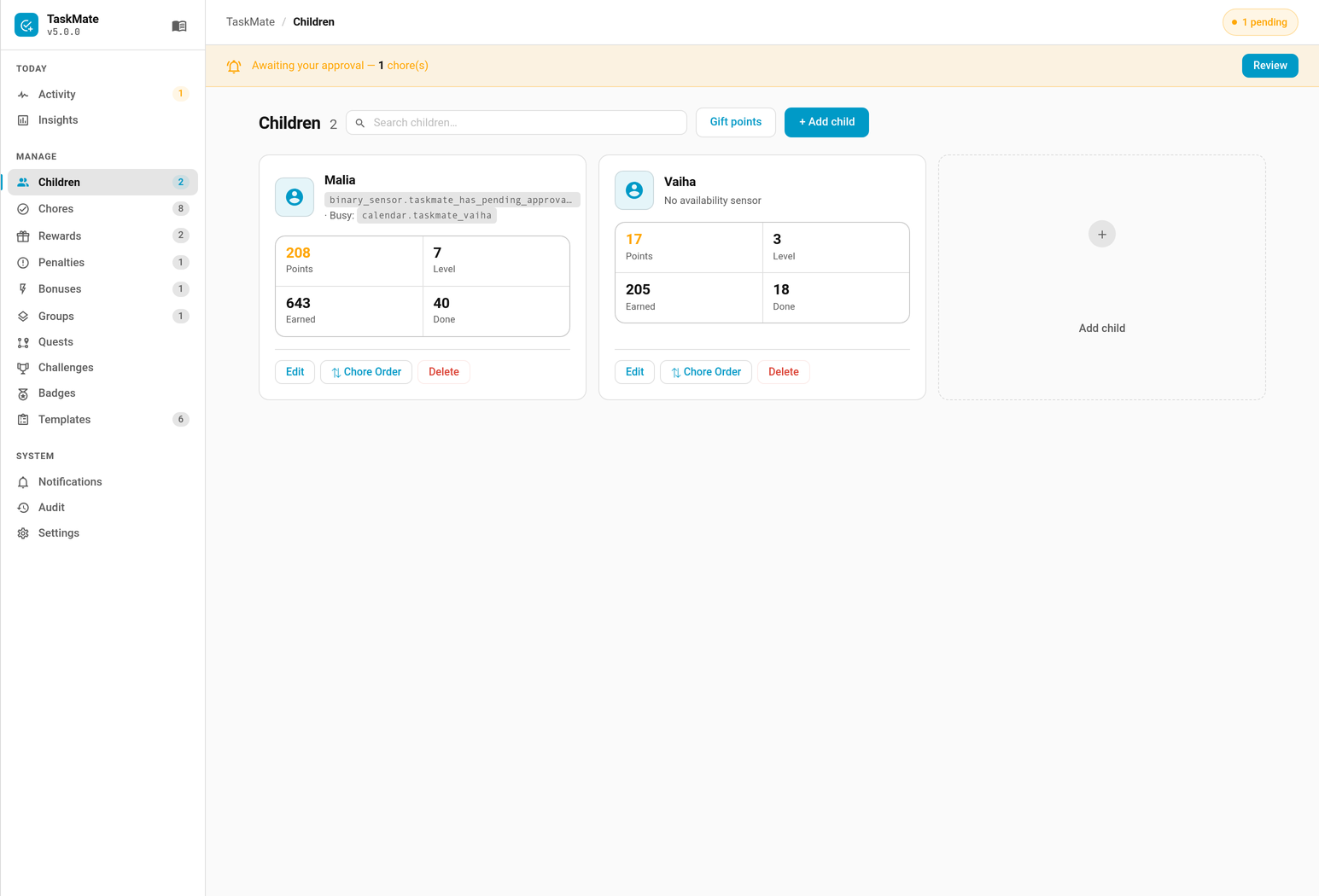
Access via the TaskMate panel → Children.
Child Fields
| Field | Description |
|---|---|
| Name | Display name shown on all cards |
| Avatar | MDI icon shown in the card header |
| Photo from | (v6.4.0) Optional entity whose picture is shown instead of the avatar icon, usually the child's person entity. See Child Photos below. |
| Adult profile | (v6.4.0) Marks the profile as a grown-up's: their chores are approved straight away, and family-wide cards leave them out unless asked. See Adult Profiles. |
| Availability Entity | Optional HA entity (e.g. a binary_sensor or input_boolean). When the entity's state is not in the recognised "available" set, the child is treated as unavailable — chores with Require Availability enabled will skip them in rotation. |
| Availability Inverted | Flips the availability logic — when enabled, recognised "available" states (on, home, available, present, true) mean the child is unavailable instead. Useful for entities like binary_sensor.child_at_school where on means the child is away. |
| Unavailability Entity | Optional second HA entity for a busy/away state (e.g. a school calendar sensor). When this entity's state is in the "available" set, the child is treated as busy. Combined logic: final_available = availability_ok AND NOT busy. |
| Quiet Hours | Optional per-child do-not-disturb window. While the local time is inside the window, this child's notifications are held back. Set in the Notifications tab. See Quiet Hours. |
Levels & XP (v4.0.0)
Every child has an XP level derived from their total_points_earned (lifetime points). XP is never spent — claiming rewards reduces the spendable points balance but never lowers the level. Levels rise as the child keeps earning.
- Level formula:
level = (total_points_earned // level_xp_step) + 1— level 1 starts at 0 XP level_xp_stepis the XP per Level setting (default100); see Settings- The overview sensor exposes
level,level_progress(XP into the current band), andlevel_targetper child - Crossing a level boundary on chore approval fires a level-up celebration (every 5th level is an "epic" tier)
See Levels and XP for the full mechanics.
Avatar Options
A child's avatar is shown in card headers and on the stats sensor icon. There are two ways an avatar can be set:
- Parent assignment — from the Admin Panel a parent can set any avatar (a free-form MDI icon or any catalogue avatar), bypassing unlock requirements.
- Child self-service via the avatar catalogue (v4.0.0 unlockables) — children pick from the avatar catalogue, but only avatars they have unlocked are selectable. The
taskmate.choose_avatarservice enforces the unlock requirement.
Avatar unlockables (v4.0.0)
The catalogue is exposed per child in the overview sensor's children[].avatar_options, each entry carrying id, label, icon, unlocked, and a human-readable requirement. Unlock gates are one of:
| Gate type | Unlocks when | Example requirement text |
|---|---|---|
free |
Always available | (empty) |
level |
Child's level ≥ threshold | "Level 5" |
points |
total_points_earned ≥ threshold |
"500 earned" |
streak |
best_streak ≥ threshold |
"7-day streak" |
The shipped default catalogue includes a free starter avatar plus level-, points-, and streak-gated avatars (for example a rocket at level 3, a robot at level 5, a ninja at level 10, a crown at 500 points earned, a trophy at 1000 earned, a fire at a 7-day streak, and a diamond at a 30-day streak). See Avatars for the full default catalogue and how parents customise it.
Free-form MDI icons
When a parent sets an avatar directly, any valid MDI icon can be used. TaskMate also ships a large selection of themed icons:
| Category | Examples |
|---|---|
| Basic faces | mdi:account-circle, mdi:face-man, mdi:face-woman |
| Fun characters | mdi:robot-happy, mdi:ninja, mdi:pirate, mdi:alien |
| Animals | mdi:unicorn, mdi:dragon, mdi:panda, mdi:fox, mdi:penguin, mdi:koala, mdi:dolphin, mdi:octopus |
| Expressive | mdi:emoticon-cool, mdi:emoticon-excited, mdi:emoticon-wink, mdi:star-face |
| Gaming | mdi:crown, mdi:trophy, mdi:rocket, mdi:sword, mdi:shield, mdi:lightning-bolt |
| Space/Fantasy | mdi:ghost, mdi:wizard-hat, mdi:ufo, mdi:dragon |
| Nature | mdi:mushroom, mdi:butterfly, mdi:flower-tulip, mdi:star-shooting |
Any valid MDI icon can be entered manually if you want something not in the list.
Child Photos
New in v6.4.0 — contributed by @cad861
A child's face can be a real photo instead of an icon. In the child dialog, set Photo from to the child's person entity (or any entity with a picture), and every TaskMate card shows that picture wherever it would show the avatar. Home Assistant's own UI shows it on the child's stats sensor too.
- Set the photo in Home Assistant. A person's picture is set under Settings → People. TaskMate stores only which entity to use and reads the picture from it each time, so a new photo shows up without saving anything in TaskMate.
- The icon is the fallback. If the entity has no picture, or is removed, the cards show the child's avatar icon as before. Children with no Photo from set are unchanged.
- It's separate from the user link. A young child often has a person with a photo but no Home Assistant login of their own, so the photo doesn't depend on Link to Home Assistant user.
- TaskMate's own child sensors can't be picked, since they show the photo themselves.
The picture is published as avatar_image on the overview sensor's children list and on each child's points, stats and badges sensors (empty when there is none). See Sensor Attributes.
Child Data
Each child stores the following data internally:
| Field | Description |
|---|---|
id |
Unique 8-character ID (auto-generated) |
name |
Display name |
avatar |
MDI icon string |
availability_entity |
Optional HA entity ID for availability tracking |
availability_inverted |
Whether availability logic is flipped |
unavailability_entity |
Optional second HA entity for busy state |
points |
Current available points balance |
total_points_earned |
All-time points earned (never decreases) |
total_chores_completed |
All-time chore completion count |
current_streak |
Current consecutive days streak |
best_streak |
Best streak ever achieved |
last_completion_date |
ISO date of most recent chore completion |
streak_paused |
Whether streak is paused (pause mode only) |
chore_order |
Custom chore display order for the child |
streak_milestones_achieved |
List of milestone day counts already rewarded |
awarded_perfect_weeks |
List of Monday dates for awarded perfect weeks |
career_score |
Long-term performance metric (total_points_earned − total_penalties_received) |
total_penalties_received |
Lifetime count of penalties applied |
level |
(v4.0+) Cached XP level derived from total_points_earned. See Levels and XP |
linked_user_id |
(v4.0+) HA user ID linked to this child; when set, only that user (or an admin) may self-serve as this child |
notify_service |
Optional per-child notify.* service override |
quiet_hours_start |
(v4.4+) Start of the do-not-disturb window in HH:MM (24h); empty = disabled. See Quiet Hours |
quiet_hours_end |
(v4.4+) End of the do-not-disturb window in HH:MM (24h, exclusive); a start later than the end is an overnight window. See Quiet Hours |
picture_entity |
(v6.4+) Entity whose picture replaces the avatar icon; empty = use the icon. See Child Photos |
is_adult |
(v6.4+) true for an adult profile |
Editing a Child
- Open the TaskMate panel → Children — select the child from the list
- Change the name or avatar
- Save the change, or use Delete to remove the child
Warning: Deleting a child is permanent. Their completion history, points, and streaks are removed. The chores they were assigned to are not deleted.
Chore Order
The order chores appear on the Child Card can be customised per child using the Reorder Card or the taskmate.set_chore_order service. The order is stored on the child record, so each child can have a different chore display order.
Logging a Past Job
Each child's profile card has a Log a past job button for a job done on an earlier day that nobody ticked at the time. See Logging Past Jobs.
Points Balance
A child's points balance is their spendable balance — it decreases when a reward claim is approved. total_points_earned is a running lifetime total that only ever increases, used for leaderboard rankings and for driving the child's level/XP and avatar unlocks.
Pending reward claims reserve points but do not deduct them until the parent approves.
Related
- Levels and XP — how lifetime points drive levels
- Avatars — avatar catalogue and unlock requirements
- Quiet Hours — the per-child do-not-disturb window
- Birthday Mode — bonus points, a badge and an optional day off on a child's birthday
- Guest Child Profiles — temporary profiles for visitors that expire on their own
- Adult Profiles — profiles for parents who log their own chores
- Logging Past Jobs — record a job done on an earlier day that nobody ticked
- Kiosk Mode — a shared wall tablet, with an optional PIN per child
- Settings — XP-per-level and other per-family settings
- Sensor Reference — per-child sensor attributes