Achievement Badges
Milestone-based recognition layered on top of the existing chores, streaks, and rewards systems. 15 built-in badges across four tiers (Bronze, Silver, Gold, Platinum), plus full support for parent-created custom badges with multi-criterion rules combined with AND or OR logic.
How It Works
Child reaches milestone → Badge auto-awarded → Optional point bonus + notification
Badges are evaluated automatically whenever a child's stats change (chore completion, streak update, perfect week, etc.). When all criteria for a badge are met, it is awarded instantly. Parents can also award badges manually for anything that doesn't fit a metric.
Tiers
Each badge belongs to a tier that determines its visual styling and prestige:
| Tier | Colour | Description |
|---|---|---|
| Bronze | #e08a3c |
Entry-level achievements |
| Silver | #a8b8c8 |
Intermediate milestones |
| Gold | #ffc107 |
Significant accomplishments |
| Platinum | #4dd9e8 |
Elite achievements |
Built-in Catalogue
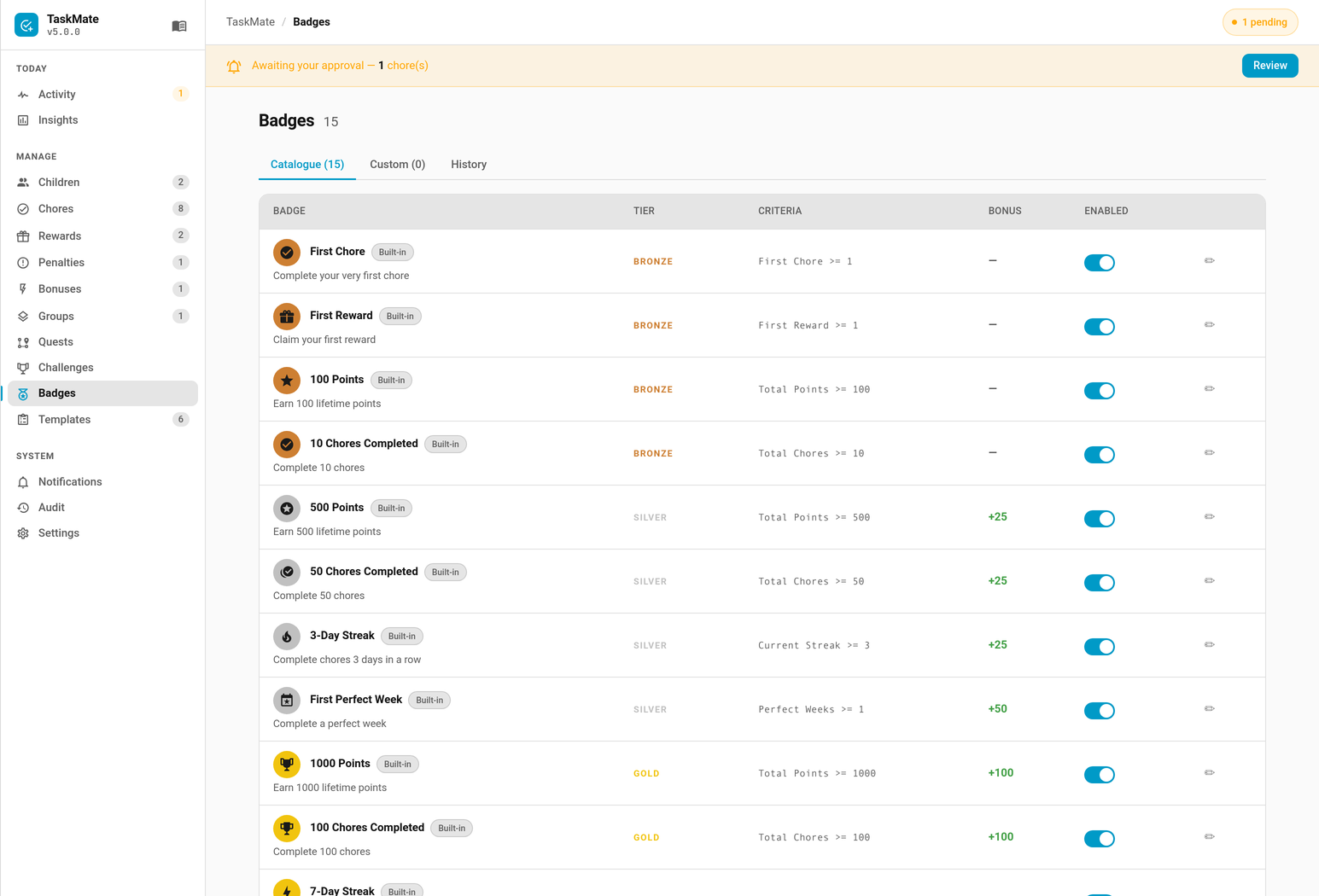
15 built-in badges ship with TaskMate. Their criteria, name, description, and icon are frozen so installs stay consistent — but you can toggle them on/off and edit their point_bonus, tier, assignment, and notify-on-earn settings.
| Tier | Badge | Criteria |
|---|---|---|
| Bronze | First Chore | Complete 1 chore |
| Bronze | First Reward | Claim 1 reward |
| Bronze | 100 Points | Earn 100 total points |
| Bronze | 10 Chores Completed | Complete 10 chores |
| Silver | 500 Points | Earn 500 total points |
| Silver | 50 Chores | Complete 50 chores |
| Silver | 3-Day Streak | Reach a 3-day streak |
| Silver | First Perfect Week | Earn 1 perfect week |
| Gold | 1000 Points | Earn 1000 total points |
| Gold | 100 Chores | Complete 100 chores |
| Gold | 7-Day Streak | Reach a 7-day streak |
| Gold | 5 Perfect Weeks | Earn 5 perfect weeks |
| Platinum | 5000 Points | Earn 5000 total points |
| Platinum | 30-Day Streak | Reach a 30-day streak |
| Platinum | 10 Perfect Weeks | Earn 10 perfect weeks |
Custom Badges
Create your own badges via the Admin Panel or services. Custom badges support any combination of metric criteria, each with its own comparison operator, combined with either AND or OR logic.
- AND (default) — every criterion must pass for the badge to auto-award.
- OR — the badge auto-awards as soon as any one criterion passes.
The combinator is set per badge with the combinator field (AND or OR).
Operators
Each criterion is a { metric, operator, value } object. The operator controls how the child's current metric value is compared against value:
| Operator | Meaning |
|---|---|
>= |
Greater than or equal (default) |
> |
Strictly greater than |
<= |
Less than or equal |
< |
Strictly less than |
== |
Exactly equal |
!= |
Not equal |
If operator is omitted or unrecognised, TaskMate falls back to >=.
Available Metrics
| Metric | Description | Example |
|---|---|---|
total_points |
Lifetime points earned | total_points >= 2000 |
total_chores |
Lifetime chores completed | total_chores >= 50 |
total_rewards |
Lifetime rewards claimed | total_rewards >= 5 |
current_streak |
Current consecutive-day streak | current_streak >= 14 |
best_streak |
Best streak ever achieved | best_streak >= 30 |
perfect_weeks |
Total perfect weeks earned | perfect_weeks >= 3 |
first_chore |
First chore completed (use value 1) |
first_chore >= 1 |
first_reward |
First reward claimed (use value 1) |
first_reward >= 1 |
Empty Criteria = Manual Award Only
A badge with no criteria can only be awarded by a parent pressing "Award to…" in the admin panel or calling taskmate.award_badge_manually. Use this for subjective achievements like "Best Helper This Week" or "Great Attitude".
Multi-Criterion Example (AND)
service: taskmate.add_badge
data:
  name: "Holiday Helper"
  description: "Earned for big effort during school holidays"
  icon: mdi:beach
  tier: silver
  point_bonus: 30
  criteria:
    - { metric: total_chores, operator: ">=", value: 20 }
    - { metric: current_streak, operator: ">=", value: 3 }
  combinator: AND
  assigned_to: [child_id_1, child_id_2]
  notify_on_earn: true
With combinator: AND (the default), both criteria must be true at the same time for the badge to auto-award.
Multi-Criterion Example (OR)
service: taskmate.add_badge
data:
  name: "All-Rounder"
  description: "Hit any one of these big targets"
  icon: mdi:star-shooting
  tier: gold
  point_bonus: 50
  criteria:
    - { metric: total_points, operator: ">=", value: 1000 }
    - { metric: best_streak, operator: ">=", value: 14 }
    - { metric: perfect_weeks, operator: ">=", value: 5 }
  combinator: OR
  notify_on_earn: true
With combinator: OR, the badge auto-awards as soon as the child meets any one of the three targets.
Using Other Operators
Operators other than >= let you target exact or upper-bound values:
service: taskmate.add_badge
data:
  name: "Comeback Kid"
  description: "Back on track after a slip"
  icon: mdi:restart
  tier: bronze
  point_bonus: 10
  criteria:
    - { metric: current_streak, operator: "==", value: 1 }
    - { metric: total_chores, operator: ">", value: 50 }
  combinator: AND
Point Bonuses
Each badge can award optional bonus points when earned. The bonus is a one-time credit applied at the moment the badge is awarded.
- Set
point_bonuswhen creating or editing a badge (default: 0) - The bonus is credited to the child's balance and logged as a transaction
- If a badge is revoked, the bonus is automatically reversed (deducted from the child's balance)
- Silent backfill (see below) never credits point bonuses — only live awards do
Retroactive Backfill
When TaskMate is first updated to a version with badges (v3.8.0+), or when a previously-disabled built-in badge is re-enabled, badges are silently awarded for milestones children have already passed.
- A child with 200 lifetime points instantly receives the "100 Points" badge
- Silent backfill never fires notifications and never credits point bonuses
- The feature works on day one without causing point inflation
Use taskmate.rebuild_badges to manually re-run the backfill sweep (e.g. after enabling a previously-disabled built-in or tweaking custom badge criteria).
Display
Badges Card
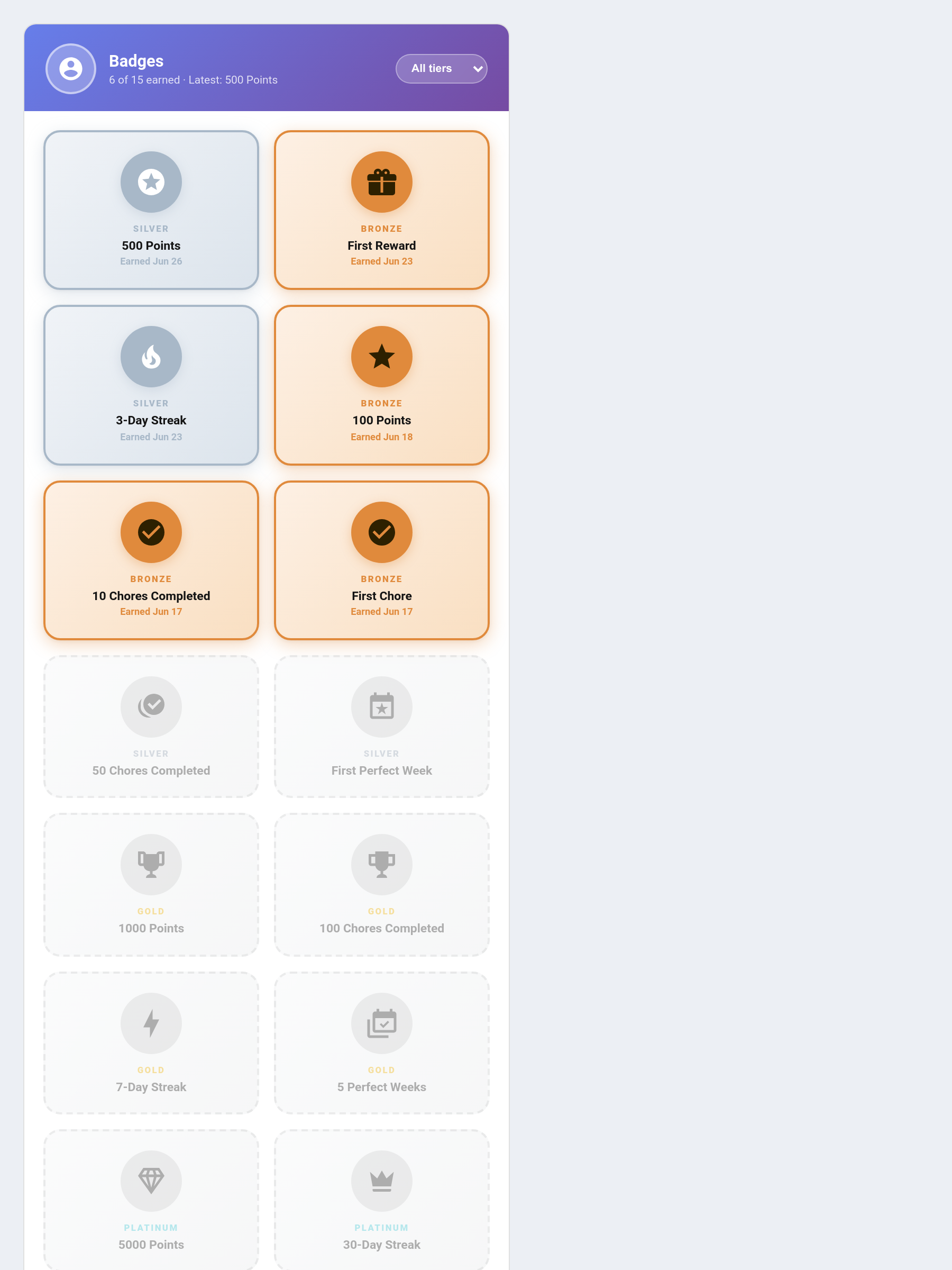
The dedicated taskmate-badges-card shows a full grid view of all badges for one or all children.
type: custom:taskmate-badges-card
entity: sensor.taskmate_overview
child_id: a8c8376a            # optional — filter to one child
header_color: "#764ba2"
Features:
- Earned badges show in full tier colour with icon, name, earned date, and point bonus badge
- Locked badges show greyed out with a progress bar and the closest-criterion completion percentage. (Those bars only started drawing in v5.1.1 — they read a closest_criterion field that nothing had ever published.)
- Tier filter dropdown (All / Bronze / Silver / Gold / Platinum)
- Newly-earned badges animate with a pop + shimmer effect
- Detects a new badge from the badges sensor, so the highlight works for every user. Before v5.0.4 the card subscribed to the taskmate_badge_earned bus event, which Home Assistant refuses for non-admin users — that logged an error on every dashboard load and the highlight never fired
Child Card Badge Strip
The child card shows an inline strip of up to 5 most-recently-earned badges below the points readout. Auto-hidden when the child has zero earned badges.
- Tap the strip to open the admin panel's badges section
- Disable with
show_badges: falseon the child card
Child Card — Next Badge Progress (v5.1.1+)
Under the earned strip, the child card shows a compact Next up line for the closest unearned badge: tier-coloured icon, badge name, a thin progress bar and a 845 / 1000 count taken from the badge's closest criterion.
Before v5.1.1 the child card only ever showed badges already won, so a child working toward a long badge got no feedback until it popped — that progress lived only in the Badges card.
- Auto-hidden when there is nothing left to earn, or when every remaining badge is still at 0%
- Tap it to open the admin panel's badges section, same as the earned strip
- Rendered on all six design styles
- Disable with
show_next_badge: falseon the child card
"One more and it's yours!" (v5.8.0+)
When that badge is one unit short of its target, a short line of encouragement appears under the bar (#893).
Distance is measured in the criterion's own units rather than a percentage, because 90% of a ten-week badge is a week away while 90% of a hundred-point badge is ten points away. It is deliberately rare — a line that shows for half the climb has stopped meaning anything by the time it matters.
- Badges you award by hand carry no criterion, so they never nudge
- Disable with
show_badge_nudge: falseon the child card
Admin Panel — Badges Section
Three tabs in the admin panel's Badges area:
| Tab | Content |
|---|---|
| Catalogue | Built-in badges with enable/disable toggles and editable settings |
| Custom | Create, edit, and delete custom badges |
| Award History | All awarded badges with AUTO / MANUAL / SILENT source pills and one-click revoke |
Revoking a badge from the Award History tab automatically reverses any point bonus that was credited.
Sensor
Each child gets a dedicated badge sensor:
Entity: sensor.taskmate_<child_slug>_badges
| Field | Description |
|---|---|
| State | Count of earned badges |
earned |
Array of earned badge objects with badge_id, name, tier, icon, earned_at, source (auto/manual/silent), point_bonus |
available |
Array of all available badges with badge_id, name, tier, progress_pct, criteria, and (v5.1.1+) closest_criterion — {metric, current, target} for the criterion nearest completion |
total_badges |
Total number of badges in the system |
Notifications
When a badge auto-earns, TaskMate sends:
- A persistent HA notification (in the notification bell)
- An optional mobile push notification (if notification routing is configured for badge_earned — see Notifications)
- A
taskmate_badge_earnedbus event for power users
Per-badge notify_on_earn toggle controls whether notifications fire (default: true).
When 3 or more badges earn in a single evaluation cycle, notifications are batched into a single combined message instead of firing separately.
Streaks themselves can also fire a separate streak milestone notification when a child reaches a streak milestone. It is off by default — opt in on the Notifications tab. See Notifications.
Services
taskmate.add_badge
Create a custom badge.
| Field | Required | Default | Description |
|---|---|---|---|
name |
Yes | — | Badge display name |
description |
No | "" |
Description text |
icon |
No | mdi:medal |
MDI icon |
tier |
No | bronze |
bronze, silver, gold, or platinum |
point_bonus |
No | 0 |
Bonus points awarded on earn |
criteria |
No | [] |
List of {metric, operator, value} objects. operator is one of >=, >, <=, <, ==, != (defaults to >=). Empty = manual-award only |
combinator |
No | AND |
How criteria combine: AND (all must pass) or OR (any) |
assigned_to |
No | all children | List of child IDs — empty = all children |
notify_on_earn |
No | true |
Fire notifications when earned |
taskmate.update_badge
Update an existing badge. Only supplied fields are changed. Built-in badges allow editing point_bonus, tier, assigned_to, notify_on_earn, and enabled only — criteria, name, description, and icon are frozen.
| Field | Required | Description |
|---|---|---|
badge_id |
Yes | ID of the badge to update |
name |
No | New name (custom only) |
description |
No | New description (custom only) |
icon |
No | New icon (custom only) |
tier |
No | New tier |
point_bonus |
No | New point bonus |
criteria |
No | New criteria list (custom only) — same {metric, operator, value} shape as add_badge |
combinator |
No | New combinator (custom only) — AND or OR |
assigned_to |
No | New child ID list |
notify_on_earn |
No | New notification setting |
taskmate.remove_badge
Delete a custom badge. Built-in badges cannot be removed — disable them instead via update_badge.
| Field | Required | Description |
|---|---|---|
badge_id |
Yes | ID of the badge to remove |
taskmate.award_badge_manually
Manually award a badge to a child, bypassing criteria evaluation.
| Field | Required | Description |
|---|---|---|
badge_id |
Yes | ID of the badge to award |
child_id |
Yes | ID of the child |
Point bonus is credited. Notification fires if notify_on_earn is true. The award is recorded with source MANUAL.
taskmate.revoke_badge
Revoke a previously awarded badge. Automatically reverses any point bonus that was credited.
| Field | Required | Description |
|---|---|---|
awarded_badge_id |
Yes | ID of the awarded badge record (from the Award History in the admin panel or the sensor's earned array) |
taskmate.rebuild_badges
Re-evaluate all badges across all children silently. Awards any newly-qualifying badges without firing notifications or crediting point bonuses. Useful after:
- Enabling a previously-disabled built-in badge
- Changing custom badge criteria
- Fixing data inconsistencies
No parameters required.
Automation Examples
Announce badge on a smart speaker
alias: Announce badge earned
triggers:
  - trigger: event
    event_type: taskmate_badge_earned
actions:
  - action: tts.google_translate_say
    data:
      entity_id: media_player.kitchen_speaker
      message: >
        Congratulations {{ trigger.event.data.child_name }}!
        You earned the {{ trigger.event.data.badge_name }} badge!
Flash lights on platinum badge
alias: Platinum badge celebration
triggers:
  - trigger: event
    event_type: taskmate_badge_earned
conditions:
  - condition: template
    value_template: "{{ trigger.event.data.tier == 'platinum' }}"
actions:
  - action: light.turn_on
    target:
      entity_id: light.living_room
    data:
      flash: long
      color_name: cyan
Related
- Bonus Points — streak milestones and perfect weeks (badge criteria sources)
- Dashboard Cards — badges card and child card badge strip
- Notifications — notification routing for badge_earned events
- Services — full service reference