Bounty Board
Some jobs aren't chores. Nobody washes the car every Tuesday, but when it needs doing you'd happily pay for it. Post it as a bounty: a one-off job with a fixed number of points that any eligible child can claim. The first to claim it gets it, finishes it, and it goes through your normal approval queue.
New in v6.0.0
How It Works
- You post a bounty — "Wash the car — 50 points" — from the Bounties page in the TaskMate panel.
- A child claims it. It is now locked to them for the claim time (2 hours by default). Their siblings see "Vaiha is on it" with the time left.
- They finish and tap Done. The job lands in your approval queue like any chore completion, with a photo if you asked for one.
- You approve, and the points are paid.
If the claim runs out before the child taps Done, the bounty goes back on the board for anyone to claim. A bounty nobody claims closes when it expires.
Posting a Bounty
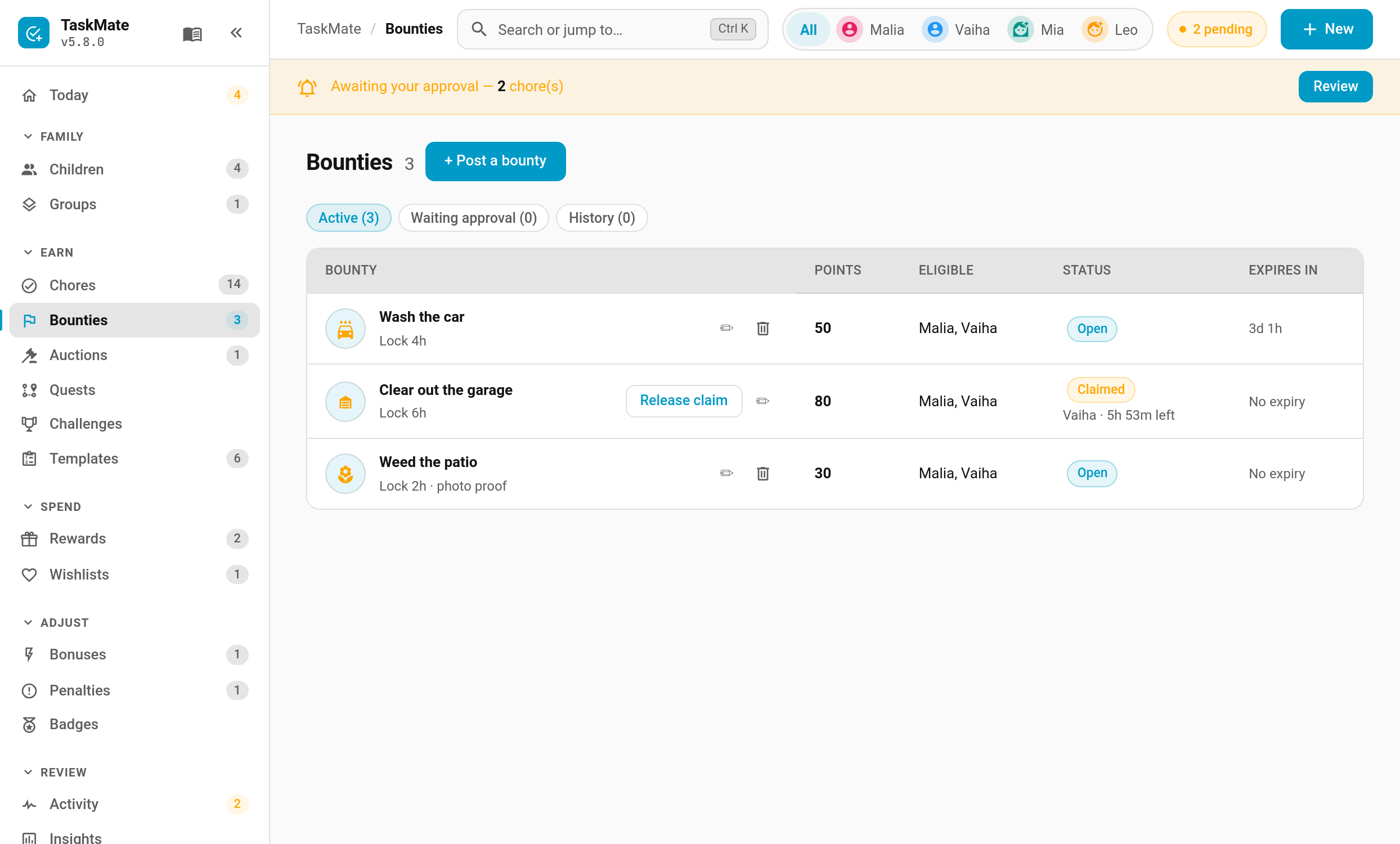
TaskMate panel → Bounties → + Post a bounty (or New → Bounty, or New bounty under Quick actions on the Today page)
| Field | Default | Description |
|---|---|---|
| Title | — | What the job is, e.g. "Clear out the garage" |
| Description | — | Optional detail: what "done" looks like |
| Points | — | What it pays. Quick picks are offered |
| Icon | — | Any MDI icon |
| Claim lock | 2 hours | How long a child has to finish once they claim it (1–48 hours). Never runs past the expiry |
| Expires | never | Quick picks or a date. An unclaimed bounty closes at this time |
| Who can claim | everyone | Limit it to particular children |
| Photo proof | off | The child must attach a photo when they finish |
| Notify eligible children | off | Sends the Bounty posted notification |
The page has three tabs: Active, Waiting approval and History. From Active you can edit a bounty, remove it, or Release claim to hand a claimed bounty back to the board.
The Rules
- One claim at a time. A child can only hold one bounty at once, so nobody hoards the good ones.
- Rejecting gives it back to the same child with a fresh claim lock, even if the bounty has since expired. They have work to redo, so it stays theirs.
- Claims that run out return to the board. There's no cool-down; the same child can claim it again.
- Editing. While a bounty is open you can change anything. Once it's claimed, only the points and expiry can change. Raising the points while it waits for approval changes what the approval pays.
- Removing. A bounty can't be removed while a finished job is waiting for your approval. Approve or reject it first.
- Children who can't claim don't see it. A bounty limited to one child doesn't appear on the other children's cards.
- It counts like a chore. An approved bounty counts toward streaks, badges, challenges and recaps.
The Card
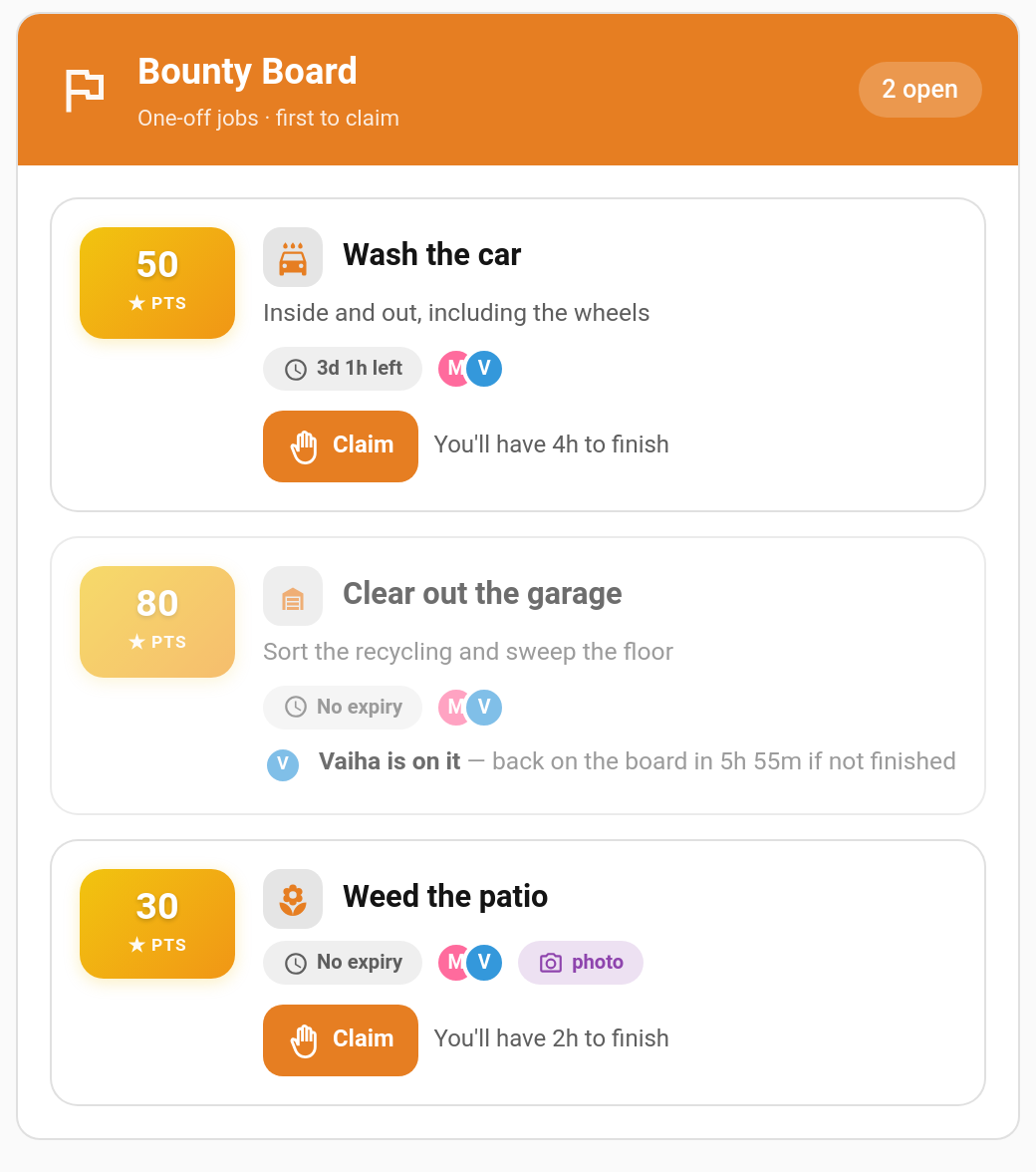
Each child gets their own view of the board. The card shows:
- Open bounties they can claim, with points, expiry, who else can claim it and a Claim button
- Their claimed bounty, with a countdown bar and Done / Give back buttons
- Bounties a sibling is on, greyed out with the time left on the claim
- Jobs waiting for approval, with an undo while the child undo window allows
- Recently completed bounties from the last 24 hours
Children can also claim and finish bounties on the shared wall tablet: switch on Bounty Board in the kiosk card (v6.3.0).
Adding the card
type: custom:taskmate-bounty-card
entity: sensor.taskmate_overview
child_id: b803da068e6a4b21
| Option | Type | Default | Description |
|---|---|---|---|
entity |
string | required | The TaskMate overview sensor |
child_id |
string | required | Whose board this is. Find IDs in the panel with Show IDs switched on |
title |
string | Bounty Board |
Card header title |
card_design |
string | global default | classic, playroom, console, cleanpro, accessible or graphite |
header_color |
string | #e67e22 |
Header banner colour |
Notifications
Both are off until you switch them on under Notifications:
| Type | Sent to | When |
|---|---|---|
| Bounty posted | Eligible children | You post a bounty with Notify eligible children on |
| Claim about to lapse | The child holding the claim | 15 minutes before their claim runs out |
Services
| Service | Who | Description |
|---|---|---|
taskmate.post_bounty |
Parent | Post a bounty. title and points are required; description, icon, expires_at, eligible_child_ids, claim_hours, require_photo and notify_children are optional |
taskmate.update_bounty |
Parent | Change a bounty by bounty_id, same fields as above |
taskmate.remove_bounty |
Parent | Remove a bounty |
taskmate.claim_bounty |
Child | Claim a bounty (bounty_id, child_id) |
taskmate.give_back_bounty |
Child | Hand a claim back to the board |
taskmate.complete_bounty |
Child | Mark it done. photo_url is required when the bounty asks for photo proof |
The new sensor.taskmate_bounties sensor's state is the number of open bounties.
Events
Every step fires a taskmate_bounty_* event you can automate on: posted, updated, removed, claimed, given_back, claim_lapsed, completed, approved, rejected, released, withdrawn and expired.
Ideas
| Bounty | Points | Claim lock |
|---|---|---|
| Wash the car | 50 | 4 hours |
| Clear out the garage | 80 | 6 hours |
| Weed the patio (photo proof) | 30 | 2 hours |
| Help carry the shopping in | 10 | 1 hour |
Related
- Chore Auctions — the other way to shift a job nobody wants
- Chores — regular, recurring jobs
- Photo Proof — how evidence photos work
- Kiosk Mode — bounties on the shared wall tablet
- Managing Rewards — the approval queue
- Automations — every TaskMate bus event