Event Entities
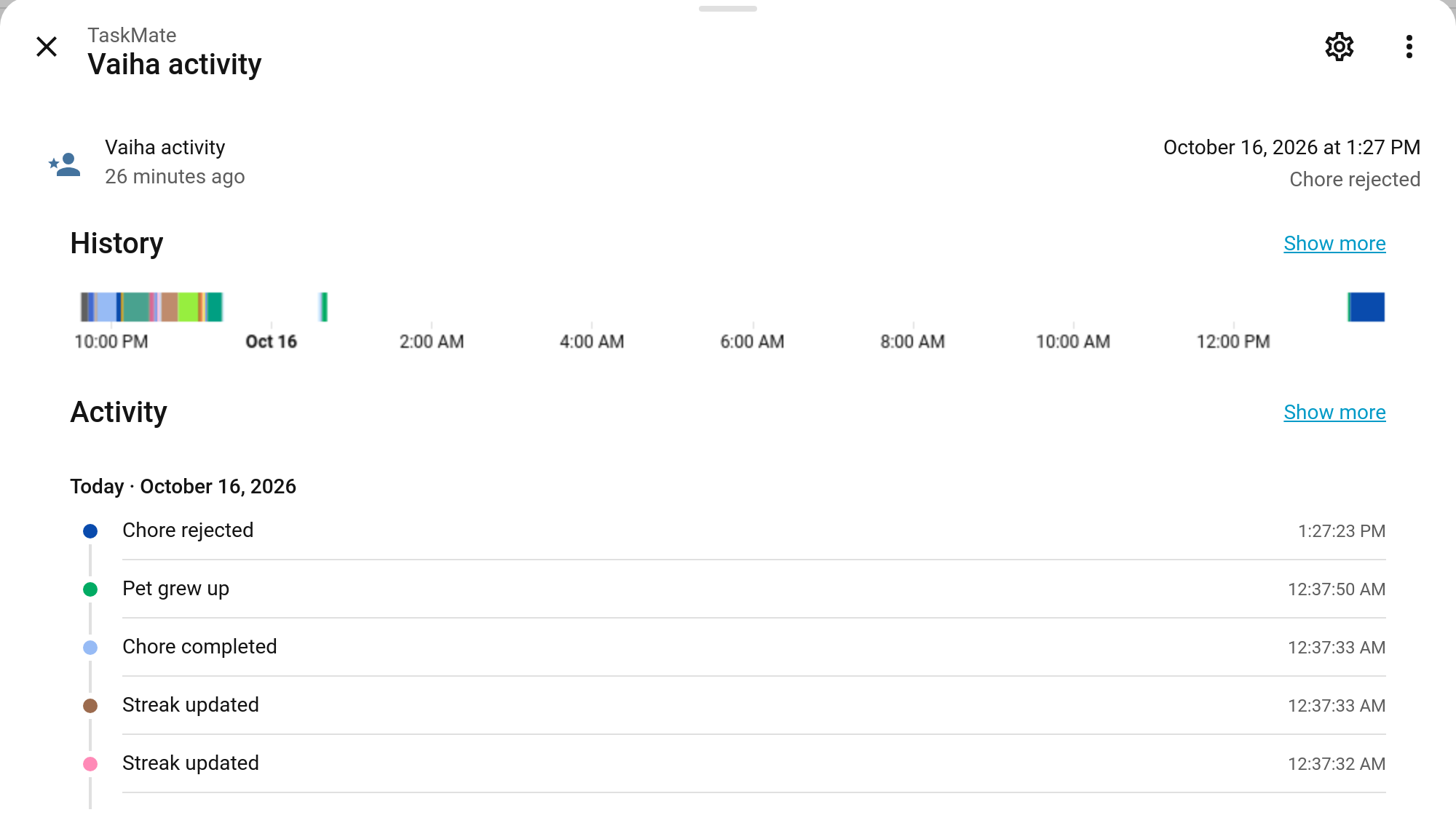
TaskMate has always fired taskmate_* events on Home Assistant's event bus for YAML automations. Event entities put the same moments where the UI can see them: one entity per child, plus one for the family. In the automation editor you can now pick "When Vaiha's activity has event type Chore approved" from a list, without writing any YAML or looking up event names. On a dashboard, the entity shows the latest thing that happened.
New in v7.0.0
The Entities
They're created automatically, on the TaskMate device:
| Entity | Example ID | Covers |
|---|---|---|
| {Child} activity | event.taskmate_vaiha_activity |
Everything about that one child |
| Family activity | event.taskmate_family_activity |
Family-wide moments |
A new child gets their entity as soon as they're added. On Home Assistant 2026.6 and later, a new entity on a device that has an area gets the area in front of its ID (for example event.kitchen_taskmate_vaiha_activity), so check the real ID in Settings → Entities.
The entity's state is the time of the latest event. Its event_type attribute says what happened, and the other attributes carry that event's details (child, chore, points and so on: the same data as the bus event, minus the timestamp).
Event Types
On each child's entity
| Event type | Shown as | Event type | Shown as |
|---|---|---|---|
chore_completed |
Chore completed | challenge_completed |
Challenge completed |
chore_approved |
Chore approved | bonus_applied |
Bonus applied |
chore_rejected |
Chore rejected | penalty_applied |
Penalty applied |
chore_approval_undone |
Chore approval undone | surprise_bonus |
Surprise bonus |
chore_auto_approved |
Chore auto-approved | mandatory_missed |
Mandatory chore missed |
reward_claimed |
Reward claimed | team_chore_completed |
Team chore completed |
reward_approved |
Reward approved | points_gifted |
Points gifted |
reward_rejected |
Reward rejected | help_requested |
Help requested |
badge_earned |
Badge earned | mood_logged |
Mood logged |
level_up |
Level up | weekly_goal_reached |
Weekly goal reached |
streak_updated |
Streak updated | sick_day |
Sick day |
streak_freeze_used |
Streak freeze used | penalty_redeemed |
Penalty earned back |
perfect_week |
Perfect week | raffle_won |
Raffle won |
weekly_target_reached |
Weekly target reached | pet_evolved |
Pet grew up |
quest_completed |
Quest completed |
An event about more than one child lands on each of their entities: a gift of points on both the giver's and the receiver's, a teamwork chore on everyone in the team.
On the family entity
| Event type | Shown as |
|---|---|
family_goal_reached |
Family goal reached |
season_champion |
Season champion |
bounty_posted |
Bounty posted |
scheduled_change_applied |
Scheduled change applied |
raffle_drawn |
Raffle drawn |
Events tied to a notification (help requested, weekly goal reached, penalty earned back, pet grew up, raffle drawn) reach the entities whether or not that notification is switched on.
Using Them in the Automation Editor
Settings → Automations & scenes → Create automation, then Add trigger → Entity → State. Pick the child's activity entity, set Attribute to Event type and To to the event you want. The editor offers the event types by name.
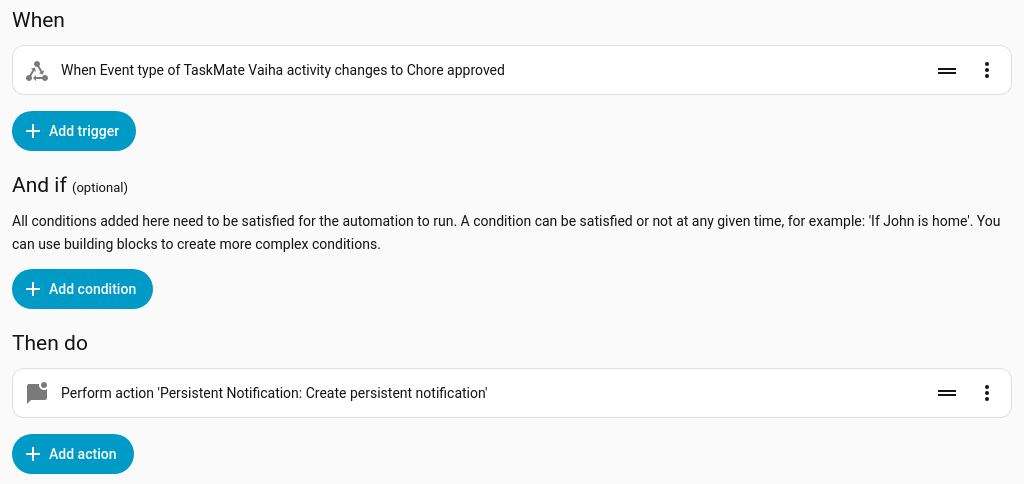
The same automation in YAML:
alias: Vaiha's chore approved
triggers:
  - trigger: state
    entity_id: event.taskmate_vaiha_activity
    attribute: event_type
    to: chore_approved
actions:
  - action: persistent_notification.create
    data:
      title: Chore approved
      message: >-
        {{ state_attr('event.taskmate_vaiha_activity', 'chore_name') }}
        is approved: +{{ state_attr('event.taskmate_vaiha_activity', 'points') }}
A trigger on the Event type attribute only fires when the type changes. To catch every occurrence, even two approvals in a row, trigger on the entity's state (it changes with every event) and check the type in a condition:
triggers:
  - trigger: state
    entity_id: event.taskmate_vaiha_activity
    not_from: unavailable
conditions:
  - condition: state
    entity_id: event.taskmate_vaiha_activity
    attribute: event_type
    state: chore_approved
Ideas
| When | Then |
|---|---|
help_requested on any child |
Flash the kitchen light |
level_up |
Play a fanfare on the living-room speaker |
raffle_drawn on the family entity |
Announce the winner on the kiosk speaker |
sick_day |
Skip the morning chore announcement for that child |
Bus Events Still Work
Nothing changes for existing automations: every taskmate_* bus event still fires, with the same data. The event entities are an extra way in. See Automations for the full list of bus events.
Related
- Automations — every TaskMate bus event and YAML examples
- Notifications — TaskMate's own pushes
- Sensor Reference — the other TaskMate entities