Approvals Card
The TaskMate Approvals Card shows every pending action that needs a parent's sign-off — completed chores waiting for approval and, from v3.0, reward claims waiting for approval.
Adding the card
Edit dashboard → + Add Card → Custom: TaskMate Approvals Card
Or via YAML:
type: custom:taskmate-approvals-card
entity: sensor.taskmate_overview
The card works with either:
- sensor.taskmate_overview (reads todays_completions filtered to unapproved + pending_reward_claims)
- sensor.taskmate_pending_approvals (reads chore_completions + reward_claims)
Configuration
| Option | Type | Default | Description |
|---|---|---|---|
entity |
string | required | TaskMate overview or pending_approvals sensor |
title |
string | "Pending Approvals" |
Card header title |
child_id |
string | none | If set, filter approvals to this child only |
header_color |
string | #27ae60 |
Card header background colour |
Display
Header
- Title on the left
- Combined pending count badge on the right (chores + reward claims)
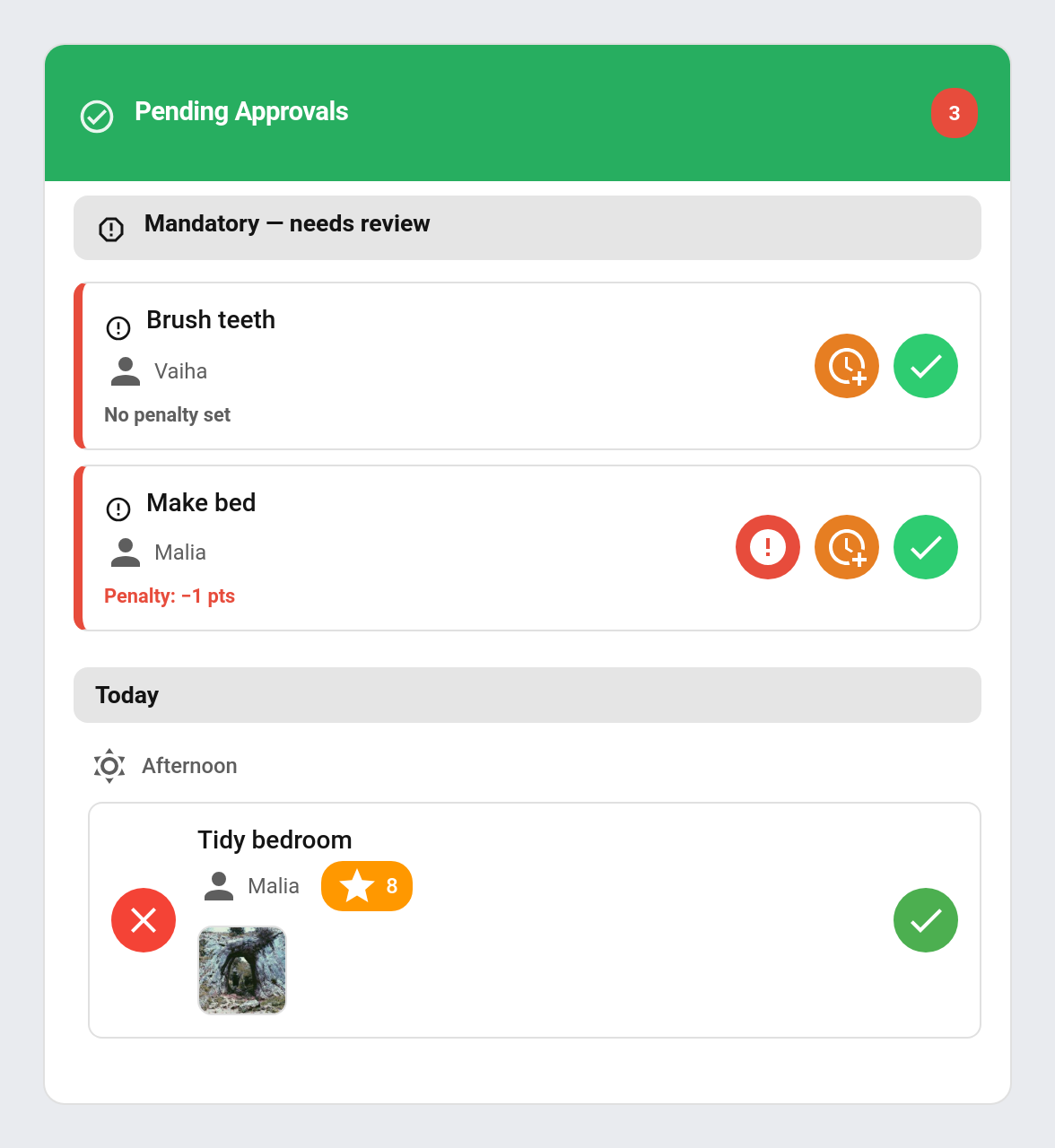
Mandatory — needs review (v4.1+)
If any mandatory chores were missed, they appear at the very top of the content — above pending completions — under a header labelled "Mandatory — needs review". A mandatory chore is missed when it isn't completed before its time-of-day period ends; points are never auto-deducted, the parent decides what to do. Each row offers three actions:
- Apply Penalty — calls
taskmate.apply_mandatory_penalty, deducting the chore's configured penalty points. The Apply-penalty button only appears when those points are greater than 0. - Postpone — calls
taskmate.postpone_mandatory_chore, giving the chore the next period today (rolling to tomorrow after the last period). Repeatable, no penalty. - Dismiss — calls
taskmate.dismiss_mandatory_chore, clearing the review item with no penalty.
Each service takes a single miss_id parameter. See Mandatory Chores for the full feature.
Reward claims section (v3.0+)
If any reward claims are pending, they appear at the top of the content, under a header labelled "Reward claims". Each row shows: - Red ✗ button (reject) on the left - Reward icon + name - Child name - Points cost - Green ✓ button (approve) on the right
Tapping ✓ calls taskmate.approve_reward. Tapping ✗ calls taskmate.reject_reward.
Chore approvals section
Chores awaiting approval appear below, grouped by day (Today, Yesterday, or the date) and by time category within each day. Each row has the same approve / reject UX.
Tapping ✓ calls taskmate.approve_chore. Tapping ✗ calls taskmate.reject_chore.
Completions that require photo proof show an evidence-photo thumbnail on the row; tapping it opens the full image.
Reference photo compare (v7.0.0)
When the chore has a reference photo (a picture of the job done well), the row also shows it as a thumbnail with a ★ badge. Tapping either picture opens them side by side, What good looks like next to What was done, so you can compare before approving. If the child sent no photo, the reference shows on its own with a reminder to compare it with the real thing. The review sheet shows the same side-by-side view. The Parent Dashboard card shows the reference thumbnail too.
Quantity chores (v7.0.0)
A quantity chore shows how many units the child said they did (e.g. "🔢 12 pages") on the row's details and in the review sheet, so you can see what is being paid for. Chores still waiting after the auto-approve timeout approve themselves and leave the queue.
Review and award (v5.7.0+)
Every chore row carries a second control beside Approve — ✍️ when the child left a description, ✎ otherwise. It opens a review sheet with the child's words, the evidence photo if there is one, and an Award box you can edit before approving.
The award replaces the chore's base points, so streaks and level multipliers still apply on top exactly as they would for a normal approval. Tapping Approve on the row itself is unchanged — still one tap, still the chore's own points.
This is how an open-ended chore gets priced, but it works on any pending completion.
Approve All (v4.4.3+)
When two or more chore completions are pending, an Approve All button appears in the chore-approvals section so you can clear the whole queue in one tap instead of approving each row. It calls the taskmate/approve_all_chores WebSocket command, which approves every currently-pending completion and runs the full award/badge/quest/streak/celebration side-effects on each — identical to approving them one by one. The same button is also available on the TaskMate panel's pending-approvals view. Reward claims and mandatory-review items are unaffected; you still action those individually.
While the batch runs, the button is disabled and shows a spinner with Approving…, on both the card and the panel. A second tap is ignored, so you cannot queue the same sweep twice.
Empty state
When nothing is pending, the card shows "All caught up!" with a check icon.
Notifications (v3.0+)
When a child completes a chore or claims/redeems a reward, TaskMate fires:
- A
persistent_notificationwith a descriptive message — "{child} claimed '{reward}' ({cost} {points_name}) and is waiting for your approval." - The configured
notify.*service, if one is set in TaskMate settings (e.g. a mobile notification)
This applies to both wallet-mode claims and pool-mode Redeems, putting them on parity with chore approvals.
Examples
Show approvals for everybody
type: custom:taskmate-approvals-card
entity: sensor.taskmate_overview
Filter to one child
type: custom:taskmate-approvals-card
entity: sensor.taskmate_overview
child_id: 8a3b2c1d4e5f6789
title: "Alice's Approvals"
Custom header colour
type: custom:taskmate-approvals-card
entity: sensor.taskmate_overview
header_color: "#3498db"
Related
- Services —
approve_chore,approve_all_chores,reject_chore,approve_reward,reject_reward,apply_mandatory_penalty,postpone_mandatory_chore,dismiss_mandatory_chore - Mandatory Chores — the "Mandatory — needs review" section explained
- Quality Ratings — rate approved chores 1–3 stars and scale the points
- Pool Mode (Savings Jars) — context for pool-mode Redeem claims