Ring
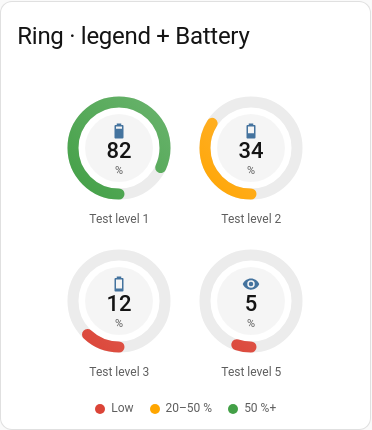
A full circle with a hollow centre showing the value and unit, the name below and the icon above the value. Several fit in a row. The arc is drawn in the colour of the current band, with a small marker for the target.
Good for
CPU, memory, disk.
Example
type: custom:chartdeck-card
style: ring
title: Server
entities:
  - entity: sensor.cpu_usage
    name: CPU
  - entity: sensor.memory_usage
    name: Memory
  - entity: sensor.disk_usage
    name: Disk
severity:
  - from: 0
    color: green
  - from: 60
    color: amber
  - from: 85
    color: red
To use this style, set style: ring (or pick Ring in the editor’s Style section).
Options that matter here
columnssets how many rings sit in a row. By default as many as fit the card’s width;columnsfixes the number per row.decimalsandunitchange what is printed in the centre; the value text shrinks to fit.show.icon: falseremoves the icon above the value.- With a range that crosses zero, the ring is drawn from the zero point.
Layout: tiles, as many per row as fit the card’s width. Every option is described on the Options page.
Previous: Tank · Next: Needle · All styles