Line (v1.2.0+)
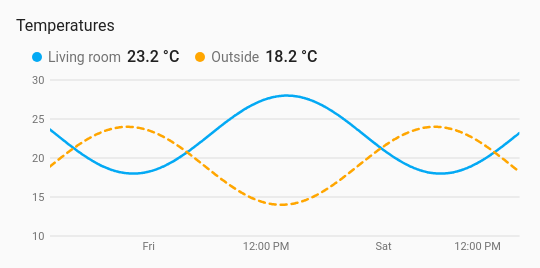
The first history chart. It draws how one or more sensors changed over a period, from the recorder’s history or its long-term statistics. Above the chart sits a row with each entity’s colour, name and current value; tapping a name opens the entity, as on the other styles. Hovering over the chart, or dragging a finger across it, shows every series’ value at that moment.
Good for
Temperatures, humidity, power, prices: anything where the shape over the last hours or days matters more than the number right now.
Example
type: custom:chartdeck-card
style: line
title: Temperatures
period:
  last: 2
  unit: day
entities:
  - entity: sensor.living_room_temperature
    name: Living room
  - entity: sensor.outside_temperature
    name: Outside
    dash: true
    line_width: 4
    on_top: true
To use this style, set style: line (or pick Line under History charts in the editor’s Style section). Everything below is in the editor’s Chart section; the per-entity options are in each entity’s options.
Period and source
period
How far back the chart looks: last (a whole number, 1 or more) and unit (hour, day, week or month). The default is the last 24 hours. The chart keeps moving: new states are added as they arrive, without polling, and loading pauses while the card is off screen.
period:
  last: 7
  unit: day
source
history (the default) reads the recorder’s state history, every change. statistics reads the long-term statistics, which reach back further than the recorder keeps history but only exist for sensors with a state_class. The statistics period (5 minutes, hourly, daily or monthly) is picked to suit the span.
Gaps where a sensor was unavailable are left as gaps. Long histories are thinned so a wall tablet stays quick.
Lines
curve
smooth (the default, never overshooting a reading), straight or step. Set on the card for every line, or on an entity for just that one.
line_width and dots
line_width is the line’s width in px, from 0.5 to 12 (2.5 by default). dots: true puts a dot at each reading. Both are set on the card and can be overridden per entity. Dots mark real readings only, and are left off a series with more than 200 readings, where they would merge into a thick line.
Per entity: color, dash and on_top
coloris a palette name or any CSS colour.dash: truedraws the line dashed.on_top: truedraws the line above the others where they overlap. Lines are otherwise drawn in the listed order, so the last is on top. The header and tooltip keep the listed order.
color_by
series (the default) gives each line its own colour. bands colours the line by the colour bands, so it changes colour where it crosses a threshold.
labels
labels: true prints the value at each point. A series with more than 40 points gets no labels, since they would overlap.
Axes and gridlines
axis_labels: outside
gridlines:
  horizontal: true
  vertical: false
y_min: 0
y_max: 30
- Value labels go up the side in round steps (1, 2 or 5 times a power of ten), with a little headroom above and below the readings.
- Time labels land on round wall-clock times that suit the span: hours (with the day’s name at midnight), day names for a week, day and month for longer, months with the year at January. They follow the language, 12/24-hour clock and time zone in your Home Assistant profile, and how many fit follows the card’s width.
axis_labels:outside(the default) puts the labels beside the plot;insideputs them over its edges.x_axis: falsehides the time labels;y_axis: falsehides the value labels.gridlines.horizontal(on by default) andgridlines.vertical(off by default) switch the lines across and down the plot.y_minandy_maxfix either end of the value scale. A reading past a fixed end is cut off at the plot’s edge.y_minmust be belowy_max.
Hover and touch
On by default. Moving the pointer over the chart, or dragging a finger across it, shows a guide line with a dot on each series and a box listing the time and every series’ value, with the entity’s own decimals and unit. An entity with no reading at that moment shows a dash. On touch, sideways drags read the chart while up and down still scrolls the page, and the box stays up for three seconds after the finger lifts.
tooltip: false turns it off (Show values on hover or touch in the editor).
Compact layout and the names row
compact: true
header: over
compact: truecuts the card’s padding, tightens the names row, shortens the plot from 180 to 110 px and uses smaller axis text.headerplaces the row of names and current values:above(the default),overthe chart’s top-left corner on a light wash of the card’s background, orhidden. Names over the chart still open their entity on tap. A hidden header leaves nothing to tap, so the entities’ tap actions don’t apply.
Layout: one chart for the whole card. Every shared option is described on the Options page.
Previous: Arc · All styles